This answer presents two dynamic options: Geometry Generator and Virtual Layers/SQL.
Option 1: Geometry generator
This option will require use of an expression, and then a font marker to display the text, which has far fewer style and placement options than labels. However it won't generate another layer and can be saved as a style to use instantly.
Expressions
Use one of the expressions below.
- To exclude the first node (i.e. 0 metres along line), change
generate_series() to start from 1 instead of 0.
---QGIS 3.4-3.8
with_variable('chainage',
10, --change chainage distance value here
geom_from_wkt('MultiPoint (' ||
    replace(array_to_string(array_foreach(generate_series(0,length($geometry) // @chainage),
    geom_to_wkt(line_interpolate_point($geometry,@element * @chainage)))),'Point ','') ||')')
)
The answer above was written for the original question since geometry functions did not support arrays as input prior to QGIS 3.10.
--QGIS 3.10+
with_variable('chainage',
10, --change chainage distance value here
collect_geometries(array_foreach(generate_series(0,length($geometry) // @chainage),
    line_interpolate_point($geometry,@element * @chainage)))
)
If you want to add the last point on the line as well, even if it doesn't match the chainage multiple, use array_append() outside array_foreach() e.g.:
--QGIS 3.10+ Append last point
with_variable('chainage',
10, --change chainage distance value here
collect_geometries(array_append(array_foreach(generate_series(0,length($geometry) // @chainage),
    line_interpolate_point($geometry,@element * @chainage)),end_point($geometry)))
)
Font marker text
You can't use the in-built labels as they can't iterate over the generated geometries to show each distance along the line.
Instead, use a font marker representation for the generated point (in addition to the point marker). Use the following expression as a data-defined override under Character(s) - add optional parameter to round() if you wish to see decimal places:
round(line_locate_point(geometry(get_feature_by_id(@layer,$id)),
geometry_n($geometry, @geometry_part_num))) ||'m'
This is how the style would be set up (red circle showing where to enter the above expression):

Font marker text rotation and offset (optional)
Unlike labels, the font marker has limited style and placement options, but you can make the text aligned perpendicular to the line using the following data-defined overrides (adapted from this answer)
Rotation (You can use this + 90 for the point marker as well):
with_variable('nodeexp',
'geometry_n($geometry,clamp(1,@geometry_part_num%1,@geometry_part_count))',
with_variable('azim',
azimuth(eval(format(@nodeexp,'-1')),
        eval(format(@nodeexp,'+1'))),
with_variable('linesrc',
geometry(get_feature_by_id(@layer,$id)),
with_variable('angle',
line_interpolate_angle(@linesrc,
                       line_locate_point(@linesrc,
                                         geometry_n($geometry, @geometry_part_num))) + @map_rotation,
if(abs(@azim - pi()) > 1,@angle,@angle - 180)))))
Offset (apply expression below to data-defined override first, then enter desired x/y values in GUI)
array(
with_variable('nodeexp',
'geometry_n($geometry,clamp(1,@geometry_part_num%1,@geometry_part_count))',
with_variable('azim',
azimuth(eval(format(@nodeexp,'-1')),
        eval(format(@nodeexp,'+1'))),
if(abs(@azim - pi()) > 1,
   to_real(regexp_substr(@value,'([^,]+),')),
   regexp_substr(@value,'([^,]+),') * -1))),
regexp_substr(@value,',([^,]+)'))
Output (10m) without first node:

Output (100m) with first node, last point and rotation/offset:

Option 2: Virtual Layers / SQL
This Spatialite query, if used in Virtual Layers/DB Manager, will generate a separate layer, and also requires the line layer to have an unique ID field. However, once generated, you can apply full control over labeling and bring in other columns from the line layer to improve styling/analysis; you can also save it as a static file with all the relevant columns.
Similar to the geometry generator method, it also generates a sequence based on the number of 10m segements in your line using a WITH RECURSIVE CTE adapted from Gabriel de Luca's method, which you can then use to interpolate points along your lines (geometry), generate a distance label column (chainage), and a label rotation column (angle).
IMPORTANT: With this method you must have an unique id column in your line layer (here id) and it needs to be part of the query. The unique id helps the query generate the right amount of nodes per line. $id and @row_number does not seem to work in Virtual Layer.
Replace id and line_layer with the unique column and line layer names accordingly
To exclude the first node (i.e. 0 metres along line), change 0 AS PART to 1 AS PART
For chainage spacing other than 10, you need to manually replace the 3 instances of 10 with your desired number (SQLite does not make it easy to declare variables).
To include the last point on the line, regardless of whether it matches the chainage multiple, delete the lines starting with /* and */
You can include other columns from the line_layer
Use "chainage"||'m' for the label text, and set the label rotation data-defined override to "angle"`
WITH RECURSIVE nodes AS (
  SELECT t.lineid, t.total, 0 AS part   --change 0 to 1 to exclude first node
  FROM totals AS t
  UNION ALL
  SELECT t.lineid, t.total, part + 1 AS part
  FROM totals AS t
  INNER JOIN nodes AS n ON t.lineid = n.lineid AND n.part < t.total
  ),
l AS (
  SELECT id as lineid,   --replace id with name of unique column
  geometry               --add other line layer columns if desired
  FROM line_layer        --replace line_layer with name of line layer
  ),
totals AS (
  SELECT lineid, cast(st_length(geometry) / 10 AS int)  AS total    --change 10 if required
  FROM l
  )
SELECT line_interpolate_point(l.geometry, (n.part10))  AS geometry, --change 10 if required
       (n.part10)                                      AS chainage, --change 10 if required
       n.lineid                                         AS lineid
       line_interpolate_angle(l.geometry, (n.part*100)) AS angle
FROM nodes AS n
INNER JOIN l ON n.lineid=l.lineid
/* Optional section to include last point
UNION
SELECT end_point(geometry),
round(length(geometry),2),
lineid,
line_interpolate_angle(geometry,length(geometry))
FROM l
*/
ORDER BY lineid, chainage
I would caution against using this query for large datasets as it hasn't been optimised.
Output (10m) without first node:
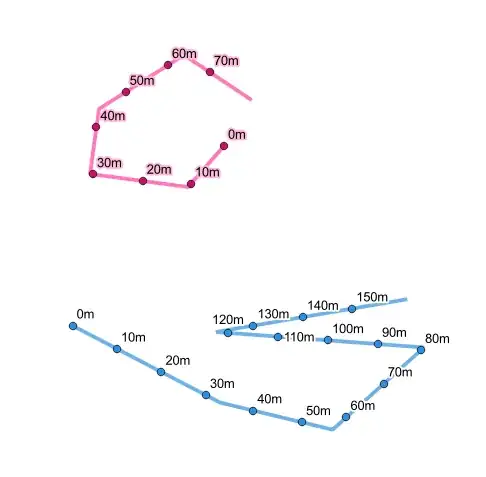
Output (100m) with first node, last point and rotation/offset:


