-3

I wish implement a GIS solution to manage a water and wastewater network. In my project I have any map for use it like background. So, I think the only solution for having a layer background, is to define it from Google Earth. I must define the scope of study or area of study in Google Earth, after I import it in Qgis.

Can someone help me in this step, and give me advice ?

Also, if someone has any documentation or tutorial, it can help me.

PolyGeo
  • 65,136
  • 29
  • 109
  • 338
BESCI
  • 637
  • 1
  • 6
  • 6

4 Answers4

1

As GM says, you must enable the Openlayers Plugin by using the plugin manager.

Your challenge will be to print the "map" which you have created with Google Earth imagery as a background and your network laid over it. Google imagery has license limitations in it's use. QGIS has a Print Composer where you arrange the map and export it to a pdf or other file type. Print Composer works OK with Google Earth imagery if you leave the main map canvas set to the Mercator CRS.

Willy
  • 3,500
  • 3
  • 24
  • 37
1

On qgis go to plugins menu, from there select Fetch Python Plugins. Let it download the list. In the search box enter Openlayers Plugin, and install the one called Openlayers Plugin. I think the latest version is 0.9 something.

After you've installed it go to project properties and select the appropiate CRS (for bing and google maps select google mercator EPSG:900913)

Next got to plugin menu in the Menu line, select Openlayers Plugin and select either google or bings aerial - just a matter of preferment.

You can select openstreetmaps as well but im not sure if they use the same CRS.

Always remember that those wms are just a background pictures, what will help you later is to select the appropriate CRS

Also take a look here : Adding Basemaps from Google or Bing in QGIS?

nickves
  • 11,519
  • 3
  • 42
  • 75
1

as others already told you: select plugins-->fetch python plugins. now abort fetching and click the repositories-tab and add the sourcepole repositorium (http://build.sourcepole.ch/qgis/plugins.xml) enter image description here

then click the plugins-tab and add openlayers plugin

enter image description here

Kurt
  • 7,087
  • 4
  • 33
  • 51
0
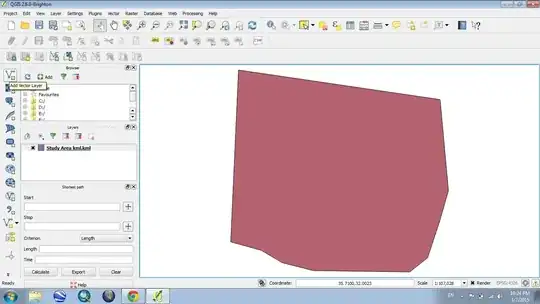
  1. Define a polygon on Google Earth and save it as .kml

  2. Open QGIS. Use ( Add vector layer ) on the left and choose the kml file. enter image description here

  3. Vector > openStreetMap > Download Data

  4. Choose the kml file and don't forget to name the output file. Press OK.enter image description here

  5. Now again, use ( Add Vector Layer ) on the left and choose the output file you just saved ( it is an osm file )enter image description here

  6. Choose which layer you want from the polygon's contents. I personally used this for the street map ( lines )enter image description here

You'll notice that it's slightly out of bounds. You can use the clipping function to fit it within the study area.

enter image description here

PolyGeo
  • 65,136
  • 29
  • 109
  • 338
Ahmad
  • 1