3

I'm looking for a regex in VBscript that I can use on a ArcMap table. I know what it would look like in python:

pat =r'[0-9]{3,4}'

This filters all numeric characters from the string which have the length 3 to 4. So from AO123 you'd get 123 and from VO2-324C, 324.

What would be the equivalent in VBScript? How do I implement it with the RexExp Object? ArcGIS has a Field calculator that let's you execute VBScript code. But even the most simple regex (see screenshot) fails with the error message object needed: 're'.
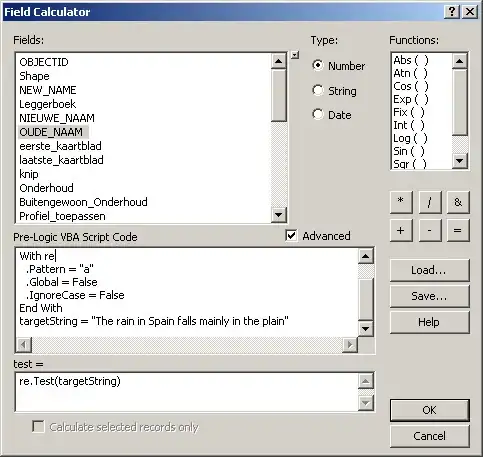
enter image description here

Antonio Falciano
  • 14,333
  • 2
  • 36
  • 66
LarsVegas
  • 2,536
  • 3
  • 30
  • 47
  • So.... what's the problem? What have you tried? –  Aug 20 '12 at 12:36
  • see my edit on the question for more detail. – LarsVegas Aug 20 '12 at 12:48
  • This sounds like an ArcGIS question - how to get regex to run through VBScript in ArcGIS. –  Aug 20 '12 at 12:50
  • You're probably right. When I posted I thought I could use the re object, just found out that ArcGIS uses the 'ATL regular expression engine' - certainly a different com object. Sorry for the confusion, I try to move my question there. Thanks. – LarsVegas Aug 20 '12 at 12:57

1 Answers1

4

The error is because you have not initialized the RegExp Object using CreateObject. I am getting results with the below script.

Pre-Logic VBA Script Code

Set re = CreateObject("VBScript.RegExp")
With re
    .Pattern = "[0-9]{3,4}"
    .Global = False
    .IgnoreCase = False
End With
targetString = [OUDE_NAAM] 'your field here

Final Result Variable

re.Execute(targetString).Item(0)
vinayan
  • 7,282
  • 3
  • 37
  • 75
  • Oh, heavenly sweetness. Nice. Didn't know you have to initialize the object like this. But what do I know about VBScript? Thanks mate, man of my Monday! – LarsVegas Aug 20 '12 at 15:03