18

I have a central point on a map, and I have other points in a separate layer (the location of a venue, and the origin cities of the venue visitors). Is there a plugin which would generate output similar to airline destination maps like this;
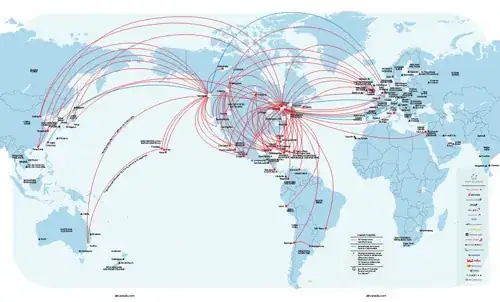
a example

They don't have to be "great circle" type of lines, just straight lines will do. This is for visual representation of point of origin for visitors of certain events.

Any tips or plugin recommendations?

normis
  • 629
  • 2
  • 5
  • 16

5 Answers5

10

If you are just looking to connect orgin/destination points and not needing the curved "great circle" lines, take a look at the QGIS plugin called "mmqgis". It has a Hub Lines tool that I think will create the visual that you are looking for.

"The hub lines tool creates hub and spoke diagrams with lines drawn from points on the "Spoke Point" layer to matching points in the "Hub Point" layer. Determination of which hub goes with each point is based on a match between the "Hub ID Attribute" on the hub points and the "Spoke Hub ID Attribute" on the spoke points."

RyanKDalton
  • 23,068
  • 17
  • 110
  • 178
6

For this to work, you will need a working PostGIS installation. Shapefiles can be loaded into PostGIS using the QGIS PostGIS Manager tool.

SQL queries can be executed in multiple tools from within QGIS (if it has connection to a PostGIS database), eg. RT SQL Layer plugin.

If you have only one destination point but multiple source points (table "source", the SQL query in http://underdark.wordpress.com/2011/08/20/visualizing-global-connections/ can be simplified to:

CREATE TABLE connections AS (
  source.id,
  SELECT ST_Transform(ST_Segmentize(ST_MakeLine(
    ST_Transform(ST_SetSRID(ST_Makepoint(--your lon lat here--),4326), 953027),
    ST_Transform(source.the_geom, 953027)
  ), 100000 ), 4326 ) AS the_geom
FROM source
);

Don't forget to first insert the CRS #953027 first.

underdark
  • 84,148
  • 21
  • 231
  • 413
  • ok, beginners question, where do I use this in QGIS? looks like a database command, but I have never used database sources in Qgis, nor do I know where to paste the above :) All my data sources are SHP or CSV files. – normis Jun 13 '12 at 08:11
  • 1
    In this case, I recommend looking into some PostGIS tutorials and the QGIS manual on working with databases. – underdark Jun 13 '12 at 08:56
  • Also without CRS# 953027 you can use the Geography feature in PostGIS: http://gisforthought.com/great-circle-flight-lines-in-postgis/ and http://gis.stackexchange.com/a/84583/16530 – HeikkiVesanto Mar 07 '17 at 09:18
4

You can depict flow maps via node-2-node flow mapping extension which is available from QGIS plugin repo;

http://plugins.qgis.org/plugins/FlowMapper/

there is also sample data and documentation within the zip file.

input node coordinates and interaction matrix should be in plane text format, white space delimited.

cempro
  • 644
  • 5
  • 11
3

You could try to follow James Cheshire's instructions from the post Mapping the World’s Biggest Airlines to achieve that in R and ggplot2:

enter image description here

Some more general mapping tips in R are also described in Great Maps with ggplot2 post

radek
  • 10,579
  • 12
  • 86
  • 121
  • 1
    Also for R Nathan Yau has a similar tutorial, http://flowingdata.com/2011/05/11/how-to-map-connections-with-great-circles/. – Andy W Jul 08 '12 at 15:45
1

Assuming your data is set up as;

ID Origin_X Origin_Y Dest_X Dest_Y

a freeware package CrimeStat can take as input a shapefile with the origin and destination locations and output a shapefile with the lines drawn. I'm pretty sure you just need to have a unique id listed in your shapefile to tell CrimeStat what lines to connect.

I'm sure you can do this more directly in QGIS though, but CrimeStat provides a gentle GUI interface to accomplish the task if need be. The prior questions on the site you want to browse are tagged .

Note you can use either projected coordinates or lat-lon in CrimeStat, but it will not produce great circle lines (which require splitting the lines into many smaller segments).

Andy W
  • 4,234
  • 5
  • 45
  • 69