25

I have had no luck getting the buffer tool to accept anything but degrees as units of measure.

I have found lots of stuff saying the layer needs to be reprojected and saved but it hasn't worked at all for me.

Is there a way I could create a buffer without using ftools or at least force the units to meters somehow?

As a workaround I converted meters to degrees (lat) and used that but the final product needs to be as close to reality as possible.

Things I've tried:

  • setting every unit option I could find to meters (where possible).
  • setting everything to NAD83/Maryland (data is for Washington, DC) and saving it as such (as layers in ESRI shape files).
  • reimporting the reprojected layers
  • setting relevant layers to Google Mercator

The was tried followed by creating a buffer. Many were tried in combination. QGIS 1.7.3 Slackware64 current (qgis from SBo-13.37 repo, tried on multilib and plain 64it with same results)

PolyGeo
  • 65,136
  • 29
  • 109
  • 338
haxwithaxe
  • 353
  • 1
  • 3
  • 4

1 Answers1

35

The buffer size is always applied in the layer CRS units. Therefore, the layer CRS has to use meters if you want to buffer in meters.

You don't need ftools to change the CRS.

  1. Open the original layer in WGS84 CRS.
  2. Right-click in layer list and select "Save as ...". (DON'T change the CRS in layer options!)
  3. Set the target CRS to NAD83/Maryland and save.
  4. Load the new Shapefile.
  5. Buffer.

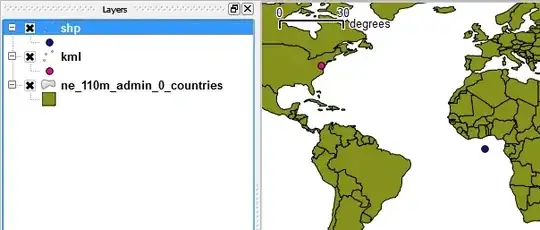
The point coordinates in the linked files have not been reprojected correctly:

enter image description here

These are the settings in "Save as ..." that work for me:

enter image description here

PolyGeo
  • 65,136
  • 29
  • 109
  • 338
underdark
  • 84,148
  • 21
  • 231
  • 413
  • 2
    The point in the Shapefile has the same coordinates as the point in the KML. But the Shapefile says its CRS is Google Mercator. The coordinates would have to be different. The coordinates have not been reprojected. How did you create the Shapefile? – underdark Apr 21 '12 at 17:59
  • I made several iterations of the shp file. I originally had it projected to NAD83/MD and the last thing I tried was something else on this site that suggested Google Mercator. I created the shp files by importing them into QGIS and then saving them as ESRI shapefiles with NAD83/MD projection (or Google Mercator in that last instance). – haxwithaxe Apr 22 '12 at 17:37
  • 1
    I started over and exported the KMLs to shapefiles without touching them and then did the reprojection and buffering and it looks like it's working. – haxwithaxe Apr 23 '12 at 04:53
  • 5
    Old thread, but how about using the MMQGIS Plugin which allows you to specify the units you want to use for your buffer? That doesn't require exporting to a new layer with a different CRS first. – mike Oct 31 '14 at 17:47
  • @mike: To be honest? I don't trust it. – underdark Oct 31 '14 at 21:55
  • @underdark - yes, i think standard caveats apply, depends on the final use and need for precision.

    i tested using the MMQGIS plugin vs converting points to SPCS and running the ftools vector>buffer

    results were nearly identical, about 20 feet off on a 3 mile buffer. again, just depends on how exact you need it. one benefit of the ftools version is the ability to specify # of segments, which provide a truer circle. thanks!

    – mike Nov 04 '14 at 17:19
  • I hardly know anything about CRS, I have only default WGS84 after installation, and I just want to give buffer in meters. Is there any easy way to do that? – Line Feb 05 '18 at 11:49
  • Reprojecting hack does not work for global data, there is no precise global projection for this. thanks @mike for mmqgis hint. It amazes that it is 2019 and QGIS (and some other GIS packages) still by default propose degree-based buffers/distances for wgs-coordinate data, which is nowdays much more common than projected data. Degree buffers (and distances) never make any real sense! The first GIS I used 25 yrs ago (MapInfo) already knew that, just implement proper and precise algorithms. – JaakL Jul 11 '19 at 08:35