2

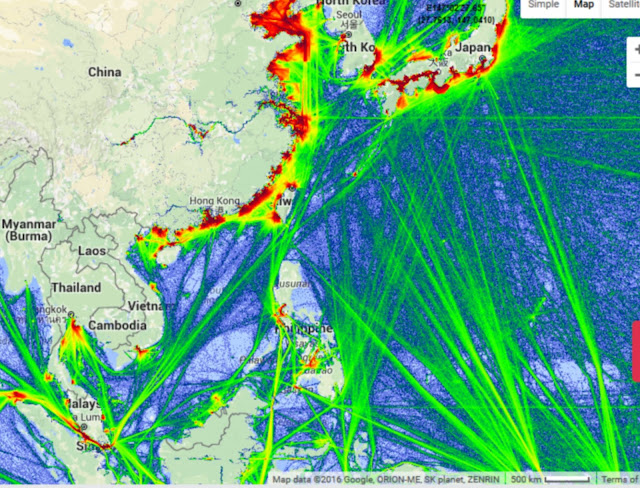
I would like create something like that in QGIS: http://2.bp.blogspot.com/--EFSaghZ92s/VqQXXIoE4AI/AAAAAAAABKw/KGkoB8zZ6K8/s640/scs2%2Bmap.jpg

I have a huge amount of points and I can import in QGIS (lat, long). I can create also heatmap but the result isn't like image above. if it is useful to the purpose, I have also the possibility to import a huge amout of line (I can join all my points with index before import in QGIS).

How can I obtain the lines density like the image above?

PolyGeo
  • 65,136
  • 29
  • 109
  • 338
lausent
  • 219
  • 2
  • 7

2 Answers2

2

What i would do is densify you lines so they have verteces all the way along them then convert them to points.

Once you have points you can create a point density raster.

whatahitson
  • 1,896
  • 3
  • 23
  • 40
  • I am afraid, the question was for QGIS (gdal, grass etc.) and not ArcGIS (Spatial Analyst). In Spatial Analyst, I'll use the Line Density function, which is easy to use. But, this is not easily found in QGIS Processing Toolbox. I've added a solution for QGIS / GDAL. – Karl Zinglersen Jan 31 '18 at 18:52
2

Using gdal_rasterize using the -burn -add switch would create a raster of densities of lines or points, with no search radius as kernel densities and similar. Just how many points or how much lines within a raster cell.

gdal_rasterize is found in the menu Raster -> Conversion -> Rasterize. In the last text field, you press the pencil button and alter the text to include "-burn 1 -add" similar to below. Naturally, you change the -tr (resolution) parameters and the input and output name according to your situation.

gdal_rasterize -burn 1 -add -tr 200.0 200.0 -l lines C:/lines.shp C:/out_lines.tif

Jukka Rahkonen gave me the hints on the gdal_dev mailing list. I've been looking for this for literally years.

Concerning the raster cell values for rasterized lines, I am unsure of what the values represent. Apparently it is not number of lines or lenghts of lines.

Line density

Karl Zinglersen
  • 447
  • 1
  • 4
  • 12