3

I have installed OSGEO4W installer. In that I have installed Express Desktop install option. QGIS GDAL uDig and GRASS GIS were installed in C:/OSGEO4W64. I have added 'C:/OSGEO4W64/bin' in the path.

But still getting error for running - 'gdal_retile.py' from command prompt as not recognising as aninternal or external command.

On using OSGEO4W shell, on running 'gdal_retile.py' and other gdal python file, I was getting -

ImportError DLL load failed: %1 is not a valid Win32 application.

I am using Windows 7 64 bit, python in OSGEO4W was Python-2.7.

EDITION

After following the condensed procedure I am getting following error on running from osgeo import gdal in IDLE

Traceback (most recent call last):
  File "<pyshell#0>", line 1, in <module>
    from osgeo import gdal
  File "C:\Python27\lib\site-packages\osgeo\__init__.py", line 21, in <module>
    _gdal = swig_import_helper()
  File "C:\Python27\lib\site-packages\osgeo\__init__.py", line 17, in swig_import_helper
    _mod = imp.load_module('_gdal', fp, pathname, description)
ImportError: DLL load failed: The specified procedure could not be found.

enter image description here

Padfoot
  • 317
  • 3
  • 13
  • Can you include the equivalent image of this: http://i.stack.imgur.com/96uKx.png – xunilk Apr 26 '15 at 15:51
  • @xunilk I included, along with the error – Padfoot Apr 26 '15 at 16:03
  • You said: "I am using Windows 7 64 bit". Did you install the correct version of Python 2.7.9 for 64 bits (with Windows x86-64 MSI installer)? This is the link: https://www.python.org/ftp/python/2.7.9/python-2.7.9.amd64.msi – xunilk Apr 26 '15 at 16:14
  • @xunilk I again installed python 2.7.9 for amd 64 but still no luck . Getting same error – Padfoot Apr 26 '15 at 17:59
  • What is the new version of this: http://i.stack.imgur.com/XD59g.png ? – xunilk Apr 26 '15 at 18:32

1 Answers1

3

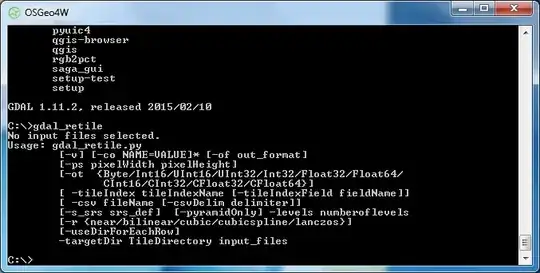
No error if you put only gdal_retile. See image below:

enter image description here

If you want to run gdal in the IDLE Python GUI or in the MS-DOS Console you can try this:

gdal ImportError in python on Windows

xunilk
  • 29,891
  • 4
  • 41
  • 80
  • Problem is that I have to run this command from cmd and in cmd I am getting the mentioned error for both with extension and without extension – Padfoot Apr 25 '15 at 18:52
  • In this case you need the condensed procedure outlined in: http://gis.stackexchange.com/questions/44958/gdal-importerror-in-python-on-windows/143140#143140 – xunilk Apr 25 '15 at 18:56
  • I have followed the provided procedure but still I am getting error, but this time different error. I have edited my question and included the error. – Padfoot Apr 26 '15 at 13:54