I have a series of buffered points. I want to apply a gradient to the buffer edge so it appears the buffer just fades away - no discrete line. How can I create this effect?
Asked
Active
Viewed 2,035 times
1


-
Note that 'fades away' can have multiple meanings. With the two methods below you'll still see an edge depending on what is underneath because they don't utilize transparency. However transparency in Arc is kind of tricky. A few related questions: http://gis.stackexchange.com/questions/83007/ and http://gis.stackexchange.com/questions/91537/ and http://gis.stackexchange.com/questions/94402/ – Chris W Apr 17 '15 at 18:55
2 Answers
1
In the symbol selector you can choose 'Circular Gradient' then select edit symbol, here you can select the color ramp style and outline type.
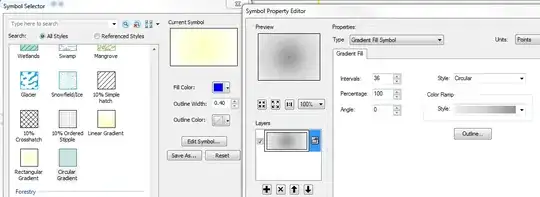
When selecting the outline type select 'Edit Symbol' again and choose the 'Null' option from the drop-down menu:

The result is a gradient buffer with no outline like this:

There may be other ways to accomplish this but this is one option.

landocalrissian
- 2,146
- 1
- 14
- 27
0
For a raster-based approach, you can use the Euclidean Distance tool. For this example, I changed the raster display to histogram equalized stretched (Layer Properties > Symbology > Stretch > Type : Histogram Equalize). The stretch type will give you control on how the buffers appear--you may want to use a custom histogram. Also, you will want to experiment with the proper cell size to find a balance between resolution and file size.


Aaron
- 51,658
- 28
- 154
- 317