3

I am trying to display data held in the PostGIS Geography type on a map in QGIS. Whatever I do I can't get it to work.

Here is the SQL that creates my data - a single point in London.

CREATE TABLE test_srid.world_points
(
  id serial NOT NULL,
  name character varying(150),
  geog_point geography(Point,4326),
  CONSTRAINT world_points_pkey PRIMARY KEY (id)
)
WITH (
  OIDS=FALSE
);
ALTER TABLE test_srid.world_points
  OWNER TO postgres;

CREATE INDEX idx_world_points_geog_point ON test_srid.world_points USING gist (geog_point);

INSERT INTO test_srid.world_points (name, geog_point) VALUES ('my_address', ST_GeogFromText('SRID=4326;POINT(0.1275 51.5072)') );

QGIS recognises this as a layer, but does not display any data:

I have found this which seems to suggest that the geography type is supported.

I've checked that the data in PostGIS is working correctly: I've created two points using code similar to the above, and run the following query:

SELECT ST_Distance(a.geog_point,b.geog_point)

from test_srid.world_points as a, test_srid.world_points as b

where a.id = 1 and b.id=2

The result came back as expected (I double checked against google maps).

Is there a setting I need to change to get this to work?
I was initially working with QGIS Brighton, but upgraded to Wien to check it wasn't anything to do with my QGIS version.

Data in geometry datatypes displays with no issue.
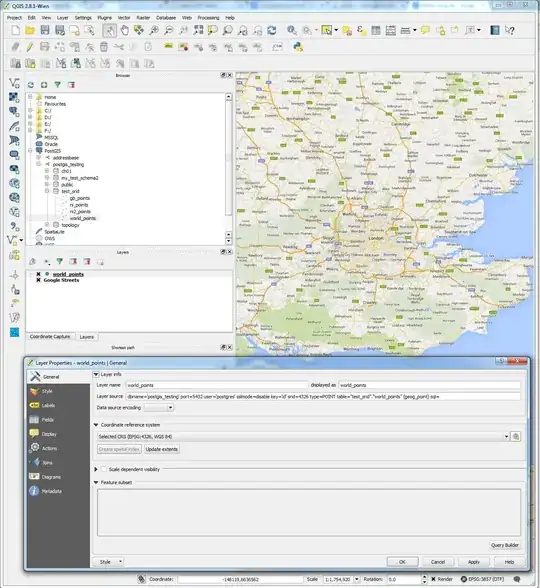
QGIS screenshot

PolyGeo
  • 65,136
  • 29
  • 109
  • 338
RobinL
  • 321
  • 2
  • 7
  • 1
    tested it and works for me. maybe you didn't use the template_postgis at creating your database in postgres? – Frau Schmidt Apr 17 '15 at 11:22
  • Wonderful - thank you. I created a new database and it now works. I used the template1 database since the template_postgis wasn't available - see here http://gis.stackexchange.com/questions/26508/how-to-create-postgis-template. This seemed to fix the problem. In the database where I was having problems, I had accidentally failed to use any template at all - which was probably why it wasn't working. – RobinL Apr 17 '15 at 11:34
  • I am having the same problem of rendering geography, but the solution of using the template doesn't seem to work. I didn't use the template, but ensured that CREATE EXTENSION PostGIS; is run, which should be equivalent (according to https://gis.stackexchange.com/questions/26508/how-to-create-postgis-template). Any ideas? – amball Apr 18 '17 at 23:38
  • Update: this seems to be a bug in the QGIS DB Manager (https://hub.qgis.org/issues/12680) that causes it to not recognize geography columns. Add PostGIS layer works, but is very slow for large databases. – amball Apr 19 '17 at 00:25

1 Answers1

1

I think we can assume it is a interoperability issue.

I had this same issue because I was using a old version 2.8.6 and I was wondering if it was my DB that was not well defined, not enough privileges, extensions weren't added, etc. But in fact it was much simpler than that.

Installing the newest version of QGIS will solve the problem and you'll be able to see your geography type. Unfortunately for me, I work also with ArcMap 10.4 and it doesn't support Geography type:

PostGIS has two spatial type options: geometry and geography. Only the geometry type is supported with ArcGIS (ESRI Docs).

Only on Arcmap 10.6+ it is supported.

ePascoal
  • 951
  • 1
  • 6
  • 23