3

I have a little situation with my data. I have vectorized a raster layer, and now I have some issues with the geometries, as you can see in the picture. Most of errors I have are like this one. Several polygons intersect themselves only in one point.

I identified them with Vector > Geometry Tools > Check geometry validity. How can I fix them automatically with QGIS?
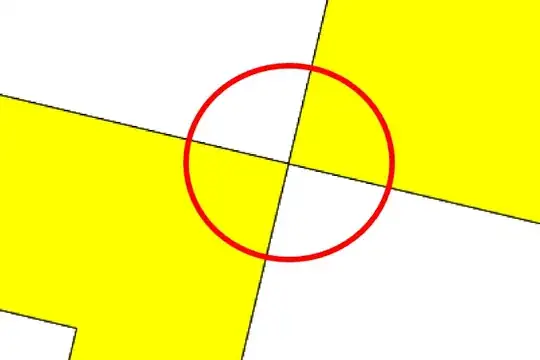
Most of errors I have are like this one. Several polygons that intersects themselves only in a node.

Chris W
  • 15,720
  • 2
  • 29
  • 47
Luismi
  • 995
  • 8
  • 20
  • 1
    Have you tried Vector > Geometry Tools > Check geometry validity? – Chris W Feb 16 '15 at 20:33
  • These are known as 'hourglass' or 'bowtie' polygons, some self intersection is very common when downloading data or extracting from raster. Have a read of https://faunaliagis.wordpress.com/2013/08/14/bad-bad-polygon-fixing-invalid-geometries-with-quantum-gis/ and see if that helps. If you have access to Esri use Repair Geometry tool - works well and is very fast. – Michael Stimson Feb 16 '15 at 23:42
  • Hi Chris. Yes, that tool allowed me realize that I had these errors. It only indicates where is the problem but don't fix it :( – Luismi Feb 17 '15 at 09:55
  • Hi Michael, unfortunately it wasn't helpful :( I'll try to see if I can reach that ArcGIS tool... Thank you! – Luismi Feb 17 '15 at 10:15
  • I haven't tried this but perhaps using the break option in the v.clean tool from GRASS might help. Here is a snippet of the description: "The break tool breaks lines/boundaries at intersections and it also breaks lines/boundaries forming a collapsed loop." – Joseph Feb 17 '15 at 10:33
  • Thanks Joseph, but the result is the same. – Luismi Feb 17 '15 at 12:15
  • Sorry, didn't know that tool had no further means to correct the errors or a 'repair' counterpart. Or that you had run it. :) There are a few more suggested methods at http://gis.stackexchange.com/questions/112687/ – Chris W Feb 17 '15 at 20:08

0 Answers0