1

I'm trying to get the percentage of each U.S. county overlaying groundwater (data from the census and USGS respectively). They're both polygons.

I have 1) correctly projected the data and the layer (NAD 83, meters) 2) clipped the counties using a polygon corresponding to groundwater coverage 3) use calculate geography to obtain the areas, so that I can then figure out proportions/percentages. I create a new field for that (double).

I've been toying around with this and other methods, and I cannot get credible area values. They're tiny; almost all 0.01 - 0.1. One of my many hunches was that it's in decimal degrees, but I've projected the data, and it's still showing up incorrectly. The most frustrating part is that the county/state files won't calculate correctly either on their own, which is bizarre (Florida = 15 m2).

Any ideas?

PolyGeo
  • 65,136
  • 29
  • 109
  • 338
user35039
  • 49
  • 3
  • 1
    If you measure the side of a polygon (e.g., Florida) with the Measure tool, what's the size in meters? If you overlay the polygons on one of the basemaps from Esri, do they look like they're correctly sized/located? Also, what are the area calculations for the state or county polygons before projection? – Erica Jul 25 '14 at 11:47
  • 1
    You describe the data as being in the "correct" projection, but you don't say what that projection is (NAD83 is a spheroid and a GCS, but not a PCS). – Vince Jul 25 '14 at 11:58
  • 1
    Would you be able to edit your question to include the GIS software and version that you are using, please? It sounds like you may be defining lat/long values as PCS instead of projecting lat/long values from GCS to PCS. More details about your precise steps will help. – PolyGeo Jul 25 '14 at 12:10
  • Erica: Everything seems normal in terms of how it shows up. I can't calculate area before it's projected, the census TIGER shapefiles only have a coordinate system. They do have a field with area in square meters which reflects census geographic identifiers. Vince: To be more specific NAD 1983 contiguous albers--yes, it's a projected coordinate system. Poly--10.1. Thanks! I'm really developing a hatred for this software though. – user35039 Jul 25 '14 at 12:25
  • Poly: I start with a regular census tiger file of u.s. counties in 2010. It only has GCS. I specify projected coordinate system for the layer and the file. I go into the attribute table, create a new field, calculate geometry-area in sq meters--and it gives me tiny numbers. (This isn't really the endgame, but if this can't go correctly that won't.) It sounds like you might know something I don't about the lat/lon. – user35039 Jul 25 '14 at 12:34
  • 1
    What is the range of values in the map extent? It seems likely you defined the projection instead of actually projecting it, so the data remains in degrees. – Vince Jul 25 '14 at 12:34
  • 1
    Are you using the Project tool in the Toolbox, or Define Projection? (Project is what you want, it actually transforms data into a new shapefile.) – Erica Jul 25 '14 at 12:35
  • 1
    Look at the western US border with Canada. If it's straight, you're still in degrees, but if it arcs, then you're in Albers. – Vince Jul 25 '14 at 12:43
  • Yeah actually you're right on with respect to counties--they show correctly and calculate perfectly. Problem is the groundwater data has no spatial reference, so you must define it first. I define, and it doesn't show up. When I've done it before it shows but can't work it out. Maybe this is one of these absurd technicality-type things--at this point I'm just saving to C folders and not everything is in the same folder directory. Ugh. At least counties work, so it's a start. Thanks for all the advice... – user35039 Jul 25 '14 at 12:55
  • (I've tried defining then projecting normally, but ill try again) – user35039 Jul 25 '14 at 13:01
  • Thanks, yeah this worked for the county file. The problem is that the groundwater file I'm using http://www.nationalatlas.gov/atlasftp.html?openChapters=chpwater#chpwater has NO spatial data whatsoever, so you have to define it. I then try and project it after defining, and nothing takes. I'm guessing I need to assign it X or Y values or something? It's a pretty old file now. – user35039 Jul 25 '14 at 13:22
  • Try a new Question for that one. It sounds like a different problem. – Erica Jul 25 '14 at 13:40
  • OK thanks everybody, I appreciate it. Have a nice weekend. – user35039 Jul 25 '14 at 13:45
  • The file I looked at didn't have NO spatial data, the information was just contained in a metadata text file (.txt suffix). It would have been nice to use the Esri .prj extension, but that's not technically part of the Shapefile specification. – Vince Jul 25 '14 at 14:45
  • I'm confused--are you referring to how the polygon is coded (i.e. codes for different aquifers)? It doesn't seem to contain anything that can help project it correctly, but obviously I'm ignorant to this. – user35039 Jul 25 '14 at 21:28

1 Answers1

5

The problem is that your data is still retaining the decimal degree numbers, although not units. Subsequent geometry calculations still use the same raw numbers that were associated with decimal degrees, but erroneously assume different units (meters). For example, if I say I'm 65 feet tall, I haven't actually grown, I'm just using different units than inches -- and the measurement is wrong even though the number is right.

The Define Projection tool only changes the associated projection, it does not modify the geometry of the feature or shapefile. (Useful if you get data with no associated projection. Not useful if you're trying to transform to a different coordinate system.)

Use the Project tool in the Projections and Transforms / Feature Toolbox, which will mathematically transform the data into a different coordinate system.

If the data projection is changed without transforming the data, it will look straight along the top (as Vince pointed out in the comments above) and a little warped. If it is transformed, it will look curved.

Side-by-side comparison of original and transformed census data

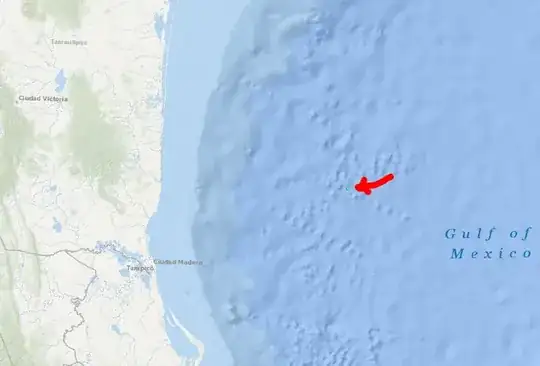
You can also check whether a projection is correct by creating a new data frame, adding in a basemap, and then adding in the data. In this case, I used Define Projection to say the coordinate system should be NAD83 Albers (Contiguous USA), and then put it on the Oceans basemap. The entire US is in the Gulf of Mexico, and is the completely wrong size -- it's that tiny dot 100 miles east of Ciudad Madero.

Tiny dot in Gulf of Mexico where incorrectly projected data went.

Erica
  • 8,974
  • 4
  • 34
  • 79