1

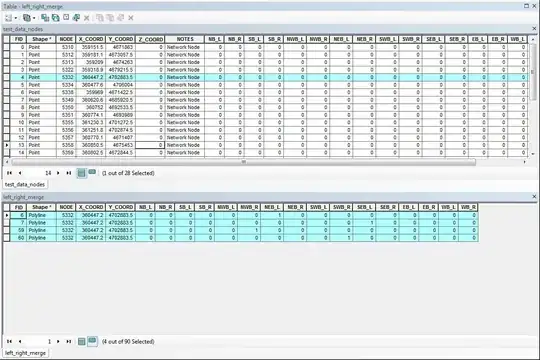
The dataset 'left_right_merge' at the bottom of my screen shot shows the dataset that I'm currently working with. The NODE values indicate a single point feature, but is duplicated with many attributes. I want to collapse the dataset so that it looks like the 'test_data_nodes' at the top of the screen shot. How would I do this in python?

enter image description here

PolyGeo
  • 65,136
  • 29
  • 109
  • 338
user30958
  • 31
  • 6
  • If you think that this is a different Question from that possible duplicate, would you be able to edit and substantially revise it to make clearer what the relationship between your desired output and inputs are, please? I don't think Python/ArcPy is the solution to your requirement as I am half understanding it. – PolyGeo Jun 24 '14 at 21:49
  • 1
    Or perhaps specify that you do NOT have access to the Pivot Tool table, and so you need to replicate that functionality with your own code. – Chris W Jun 24 '14 at 21:51
  • 1
    I do not understand how you want to limit the fields. How do you decide which fields to keep? – Aaron Jun 24 '14 at 21:58
  • If you look at the bottom table (start condition) you see one node value in four records with one value. The goal is to collapse them into one as shown in the top table while keeping all fields, so you end up with one record with four values. – Chris W Jun 25 '14 at 00:33

3 Answers3

2

There might be a more elegant way to do this, but here is a quick & dirty script base on my understanding of your problem:

import arcpy

arcpy.env.workspace = r'C:\Users\echiasson\Documents\ArcGIS\Default.gdb' # Replace correct geodatabase path
arcpy.env.overwriteOutput = True

# Make a copy of the original feature class
arcpy.Copy_management('left_right_merge', 'left_right_merge_collapse')

# Collapse the output feature class
nodeList = []
with arcpy.da.UpdateCursor('left_right_merge_collapse', ['NODE']) as cursor:
    for row in cursor:
        if row[0] in nodeList:
            cursor.deleteRow()
        else:
            nodeList.append(row[0])

for node in nodeList:
    # Compile the values in the original feature class
    attList = [0,0,0,0,0,0,0,0,0,0,0,0,0,0,0,0]
    with arcpy.da.SearchCursor('left_right_merge', ['NB_L','NB_R', 'SB_L', 'SB_R', 'NWB_L', 'NWB_R', 'NEB_L', 'NEB_R', 'SWB_L', 'SWB_R', 'SEB_L', 'SEB_R', 'EB_L', 'EB_R', 'WB_L', 'WB_R'], "NODE = " + str(node)) as cursor:
        for row in cursor:
            for i in range(0,15):
                if row[i] != 0:
                    attList[i] = row[i]

    # Update the values in the collapse feature class
    with arcpy.da.UpdateCursor('left_right_merge_collapse', ['NB_L','NB_R', 'SB_L', 'SB_R', 'NWB_L', 'NWB_R', 'NEB_L', 'NEB_R', 'SWB_L', 'SWB_R', 'SEB_L', 'SEB_R', 'EB_L', 'EB_R', 'WB_L', 'WB_R'], "NODE = " + str(node)) as cursor:
        for row in cursor:
            for i in range(0,15):
                row[i] = attList[i]
            cursor.updateRow(row)

Please leave a comment if I am missing something.
ericchiasson
  • 1,092
  • 6
  • 7
  • Thanks for taking the time to do this. When I run the code, I get this error message:

    Traceback (most recent call last): File "S:\AdminGroups\ResearchAnalysis\Nguyen\TRANSIMS network\Python\cardinalDirection\data_management.py", line 141, in cursor.deleteRow(row) TypeError: deleteRow() takes no arguments (1 given)

    I've tried debugging, but no progress thus far.

    – user30958 Jun 25 '14 at 20:06
  • @user30958 sorry about that... Obviously, I didn't test my script before submitting - although the code logic is sound. I've fixed the code (i.e. remove the argument in the cursor.deleteRow()). Let me know if you run into other issues. – ericchiasson Jun 25 '14 at 20:18
  • Another error comes up.

    Traceback (most recent call last): File "S:\AdminGroups\ResearchAnalysis\Nguyen\TRANSIMS network\Python\cardinalDirection\data_management.py", line 148, in with arcpy.da.SearchCursor('left_right_merge.shp', ['NB_L','NB_R', 'SB_L', 'SB_R', 'NWB_L', 'NWB_R', 'NEB_L', 'NEB_R', 'SWB_L', 'SWB_R', 'SEB_L', 'SEB_R', 'EB_L', 'EB_R', 'WB_L', 'WB_R'], "'NODE' = " + node) as cursor: TypeError: cannot concatenate 'str' and 'float' objects

    – user30958 Jun 25 '14 at 20:52
  • This is a learn as you go kind of deal for me--I appreciate the help. – user30958 Jun 25 '14 at 20:53
  • It would help to have a sample of the data. I've converted the float to a string in the queries. We should be close to the finish line. – ericchiasson Jun 25 '14 at 21:13
  • Here's a link to the sample data. http://www.filedropper.com/leftrightmerge_1

    Still a Type Error...

    – user30958 Jun 25 '14 at 21:34
  • @user30958 I've debug the script, assuming all your fields are integers. Next time, instead of sharing a CSV file, you can use export either a XML Workspace or Recordset Document. This will carry the geometry and maintain the fields' data type. – ericchiasson Jun 26 '14 at 01:32
0

If you have the Advance (ArcInfo) version of ArcMap you could simply run the Delete Identical tool, no need for any python.

When you ask a question you should state the GIS system you have, license level and appropriate extensions as this will dictate the response you'll get as some tools become available for use with higher license levels.

Hornbydd
  • 43,380
  • 5
  • 41
  • 81
  • This had already been suggested as an answer and apparently deleted. The problem is there are no identical records. See my comment on the question. – Chris W Jun 25 '14 at 00:33
0

I didn't think of this earlier, but in the previous question you were working with a single table. Another option is a Spatial Join, which is available at all license levels and so not restricted as the Pivot Table tool is. I have confirmed that you can Spatial Join a layer to itself.

You would set your reduced point table (one record per node) as your target features and your duplicated node table as the join features. By selecting a Join_One_to_One operation, you can create field map merge rule for each of your other fields using Sum. In the resulting output point table, you should get your one record per node with the sum of all the identical node attributes - in this case 1 if there is an attribute value at all, and 0 if not.

Again, at the help page linked above are Python code samples for both a Window and stand-alone script.

Chris W
  • 15,720
  • 2
  • 29
  • 47