I've managed to download Minecraft onto my SandDisk USB thumbdrive.
But how do I copy all my worlds to it?
Asked
Active
Viewed 1,428 times
0


-
VTR: This is asking how to transfer world files, not the entire game itself. – Schism Dec 28 '14 at 01:35
-
True, but there's other duplicates: http://gaming.stackexchange.com/questions/14702/where-are-my-minecraft-saves-located and http://gaming.stackexchange.com/questions/163377/how-to-backup-and-restore-your-local-minecraft-files – Private Pansy Dec 28 '14 at 07:56
1 Answers
2
Worlds are saved in the computer hard drive.
If you open explorer and go to %appdata%, you will see .minecraft.
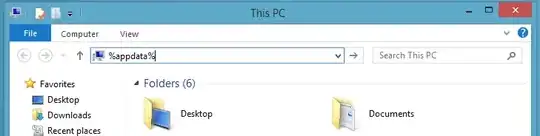
The subfolder saves contains the folders with the worlds you want.

Tip: %appdata% is the same as C:\Users\George\AppData\Roaming, where you replace "George" with your name.

GeoMint
- 183
- 1
- 8
-
1On Linux the path is
~/.minecraftand on Mac it's~/Library/Application Support/minecraft. The approach is the same. – Lars Dec 28 '14 at 11:37