1

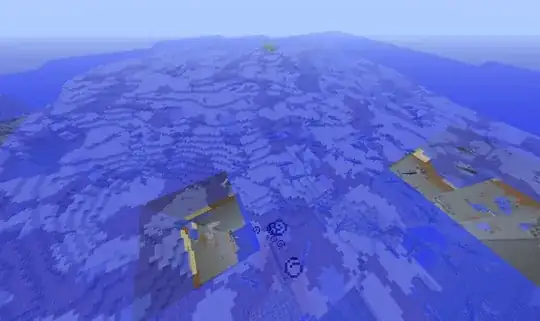
I just went on to my minecraft world and in the middle of a underwater structure that I had built with no issues yesterday was a huge hole. I can't place block or even go into it. Several of these appeared and they even started to occur on land. Also I have the Mo' Creatures mod and alot of the rays and dolphins are spawning around these areas.
enter image description here/EbQF7.jpg

enter image description here

3 Answers3

7

Log out and then log back in again. This act of reloading the world should cause the client to regenerate the area.

What you are experiencing are 'Chunk Errors'. The world hasn't loaded that particular area properly.

shanodin
  • 10,362
  • 12
  • 60
  • 90
1

You can press F3+A to force reload the missing chunks, it doesn't always work in my experience though.

ratchet freak
  • 3,830
  • 2
  • 23
  • 24
0

Shorten your field of view. Or at the very least, cycle through them once.

Changing your field of view forces the chunks around you to reload, and using a shorter field of view means having fewer chunks you need to load, which can drastically reduce the hole-in-the-world syndrome you're experiencing.

Zibbobz
  • 12,897
  • 22
  • 84
  • 140
  • that doesn't seem to be working either – Shadow Jonarc Landex Apr 25 '14 at 03:24
  • @ShadowJonarcLandex Try lowering the view to minimum and playing without a few of the mods. The reason lower field of view helps is because large voided chunks can occur when there's too many processes going on in the game at once, and reducing the amount of land that needs to be drawn helps. De-activating some mods should have the same effect. Though if you know processing isn't an issue, this probably isn't the solution you're looking for. – Zibbobz Apr 25 '14 at 13:04