I frequently see that my friends on Steam are playing Hello Kitty: Island Adventure. I know that this is not accurate. Why is Steam reporting that they're playing a game that isn't on Steam? Is Steam lying?
Asked
Active
Viewed 6.1k times
59


-
9Do they have children or girlfriends? – John Gietzen Jul 09 '10 at 14:33
-
Have they got kids? – monorailkitty Jul 09 '10 at 14:35
-
21How would kids or girlfriends be in the picture? They're gamers. @joh – Eight Days of Malaise Jul 09 '10 at 14:42
-
@random: He's saying it could be the kids playing on his Steam account. – Jul 09 '10 at 14:49
-
24Friends dont let friends play Hello Kitty games. – Fredrik Jan 04 '11 at 09:05
-
3you can also change the name of a game, my friend plays a lot of "what what in ze but", but I don't think that's a game either :p – Sir Ksilem May 26 '11 at 05:59
-
1A few times I've seen a friend playing "with himself" – SaintWacko Dec 21 '11 at 19:24
-
1I have my browser as a non-steam game. When it starts up Steam will tell my friend that I am "playing with cats" – Batophobia Jul 16 '13 at 15:59
5 Answers
76
As Gnoupi said, it's possible to report any game you want to play as a non-Steam game.
In this case, it's a joke reference to the episode "Make Love, Not Warcraft" of South Park, in which Butters prefers Hello Kitty Island Adventure over World of Warcraft.
As far as I know no such game exists.
By the way, there's a similar exploit where it is possible to show yourself playing a game which you have pre-loaded, but is not yet released, by using a utility that reports the AppID to Steam. This means you can't even trust the regular in-game titles either. I've been known to "play" Left 4 Dead 2 and Portal 2 prior to its release.
-
5While there is no Hello Kitty Island Adventure, there is a Hello Kitty Online. – Mar 11 '11 at 13:46
-
7
-
40
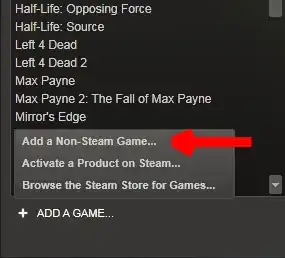
You can make Steam say you're playing anything. All you have to do is add a non-Steam game shortcut and rename it. I heard about a fantastic April Fool's prank where someone did this and named the shortcut "Half-Life 2: Episode Three." All of his friends freaked out! Pretty classic.
To add a non-Steam game to your games library, select Add Game at the bottom left of Steam and select the corresponding menu item:

Sathyajith Bhat
- 2,929
- 11
- 40
- 62

cowgod
- 7,728
- 13
- 50
- 75
-
-
12It doesn't have to be a game. Add calc.exe as "Half-Life 2: Episode Three" and leave the calculator running to rack up serious friend envy. – Chris Nava Aug 04 '10 at 18:59
-
4The confusion I sowed by doing this and idling in the Team Fortress 2 chat room just before the game was released was hilarious. – Brant Mar 16 '11 at 17:31
8
Steam is not lying on such reporting, for games in their library.
It is possible to be shown as playing just about anything, since you can add a third party game to your game list, and give it the name you want. It will be written as "In a non-steam game" under, though.
Since there is no "hello kitty" game in the Steam store, I assume that this is what is done there.

Gnoupi
- 5,671
- 4
- 41
- 59
-
2This isn't technically true, since Steam can be made to lie about Steam games. – May 08 '11 at 16:40
-
1
6
You can hook up games (or really anything) in your Steam UI. In fact, as a joke, I made it so that when I am programming it will say "Melanie Shebel is now playing Vim."

Melanie Shebel
- 1,298
- 10
- 17
3
As others have said, it is possible to add any game to steam and rename it to whatever you want.
It is also possible to fake that you are playing games that aren't yet released by changing the App id in the config files. So, if you see that your friend is playing example brink before it's released, it is faked. This method also counts time towards the game.
Melanie Shebel
- 1,298
- 10
- 17

Lauri
- 266
- 1
- 2
-
I already noted this in my answer. It isn't necessary to modify configuration, you can also just run a lightweight app that does the false reporting for you. – May 08 '11 at 16:40
-
I would not install any EXE stuff that interfaces with my Steam. I would rather not lose my account or get vac-banned with shady stuff :P But yeah, didn't read all answers. – Lauri May 08 '11 at 17:41
-
@k00pa People keep saying that... It's not VAC bannable. At all. Not even close. I think we need a question on what VAC is, since nobody seems to understand. – May 08 '11 at 17:49
-
Well yeah. The program itself is not VAC-bannable if it only does the faking. However, if the creator is evil. He can make it attach itself to TF2 next time you play, causing VAC-ban. I understand what VAC is and what it does. My account is worth of over 1500e, so I am not taking any risks. (and its easy to fake the appid manually.) – Lauri May 08 '11 at 18:45
-
@k00pa 'Manually' would mean writing the program yourself. I agree with you that it is easy, but not everyone thinks that way. As for the 'evil creator' problem, the same could happen with anything you download, even if you download it from a trusted source. (Except if you use HTTPS to download it). A good AV works wonders, and detects most injectors heuristically. – May 08 '11 at 19:59
-
It actually doesn't need any applications. You can just rename the appid on configs and then rename the exe to correct. Then just start it and steam will think you run different game. This program most likely just automates this. – Lauri May 09 '11 at 06:02
-
2@k00pa No, it doesn't. The program (which I wrote, by the way) reports to Steam like a game, so that it thinks a game is started when it isn't. The advantage is that I can also fake invites, for example. Your method requires you to start up a game. The program replaces the game, and therefore also the need to have a game started up (which costs more CPU). – May 09 '11 at 13:29
-
Ah. Well, if you did write it I think you can trust the application :D Are you sending fake requests to Steam API then? Yeah. Then there isn't any risk of VAC-ban. – Lauri May 10 '11 at 11:05
-
@k00pa I'm basically invoking the same functions in Steam's official DLLs as Steam games do. Unfortunately it's outdated now. Might look into rewriting it one of these days. – May 10 '11 at 11:36