22

What Z-Level are the clouds at?

I've found the perfect place to build my minecraft base
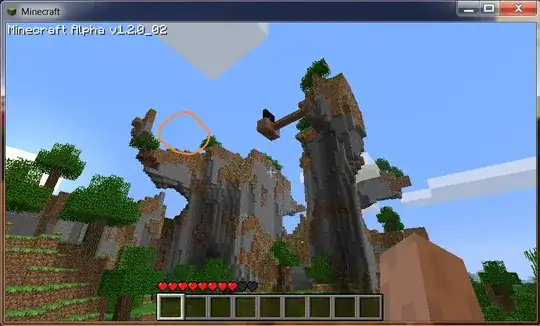
alt text

Right there, in the orange circle. But I can't help but notice. That's pretty damn high. I know minecraft has a max z-level limit, and if my base-to-be is situated above the clouds, I must be getting close to the top.

I'm still trying to fix my portal system so that I can consistently get up there (Freakin' portals, how do they work?) and until that's fixed (or I laboriously carve stairs back up to the top) I can't test for myself.

So if I'm already above the clouds -- how much higher can I go?

Raven Dreamer
  • 171,485
  • 137
  • 675
  • 963
  • The inexact answer is, not much higher (a few blocks). But I'm sure someone will come along with a more precise measurement. – Dan Lew Nov 05 '10 at 16:42
  • 19
    Y is the axis height is measured in not Z – Ronan Nov 05 '10 at 18:16
  • 2
    It might be easier to just get a pile of like sand and just jump placing blocks below you. Once you can no longer jump any higher you know you have reached the top. Build a second stack of sand and dig your way down and count blocks. – Zoredache Nov 05 '10 at 18:55
  • 7
    @Ronan I'm not sure where you got that idea. Z is height. – Invader Skoodge Nov 05 '10 at 18:56
  • 4
    @StrixVaria -- well he's true -- for 2 dimensions, anyway. As minecraft is 3d, however, you have the right of it. – Raven Dreamer Nov 05 '10 at 19:08
  • @StrixVaria Ahem – Ronan Nov 06 '10 at 00:11
  • 1
    @Ronan Forman -- http://www.flashandmath.com/advanced/simple3d/pic1c.jpg – Raven Dreamer Nov 06 '10 at 00:34
  • @Ronan Anyone can make a pretty graph. That doesn't make it correct. – Invader Skoodge Nov 06 '10 at 03:35
  • I didnt make that graph and have you even checked to see if you right before arguing? – Ronan Nov 06 '10 at 09:35
  • 13
    @StrixVaria (and @Raven) in computer graphics Y usually represents the vertical axis (up and down the screen), X left and right and Z in and out the screen. However, some systems do use the coordinate system you link to. Given that positive values can be taken in either direction you can get a lot of variation. I used to work in 3D graphics and had to translate data from one modelling system to another and it was a pain as you had to check what coordinate system the source and target systems used and account for it. – ChrisF Nov 06 '10 at 11:10
  • @ChrisF Fair enough. Thanks for the clarification :) – Invader Skoodge Nov 06 '10 at 12:20
  • 13
    Ronan is right: http://www.minecraftwiki.net/wiki/Coordinates – SevenSidedDie Apr 28 '11 at 19:54
  • 1
    OUTDATED because of anvil. – Joe the Person Mar 24 '12 at 17:07

5 Answers5

18

As of 1.2.1, the build limit doubled from 128 to 256, while cloud height appears to not have moved. This means you actually have more room to build above the clouds (about 128) than you do between sea level and the clouds (about 64).


As of Beta 1.8, clouds now appear above the build limit. Notch also claims to have made the level height more consistent throughout the code, which leads me to assume that the clouds will always remain above the build limit regardless of that actual number.

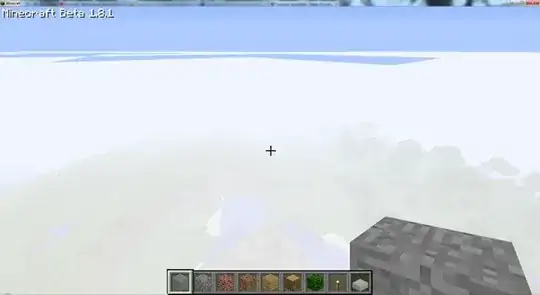
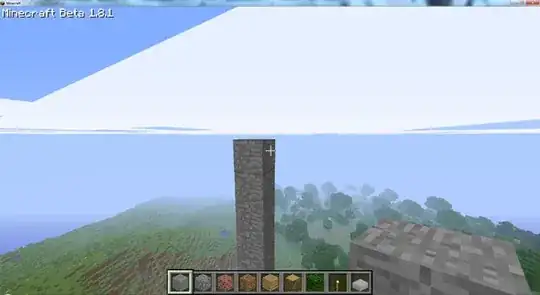
I tested this by building the tallest possible pillar in creative mode. Standing on top of it (picture 1) puts your head just above the clouds. Flying beside it (picture 2) confirms that the clouds are above the build limit. Standing on a 1 meter shorter pillar puts the clouds just above your head, meaning that the clouds are about 1.5 meters above the build limit.

Standing on the height cap. Flying beneath the clouds.

dlras2
  • 6,596
  • 9
  • 46
  • 72
  • I originally added a comment noting this fact to Badp's answer. Given that he seems disinclined to edit it, however, I may as well switch the accepted answer away from the outdated one. – Raven Dreamer Sep 21 '11 at 01:46
  • @RavenDreamer - Ah! I had looked for updated answers, but missed your comment. I reckon there are lot of outdated Minecraft questions out there after the last few big releases.. – dlras2 Sep 21 '11 at 01:49
  • 1
    Well, I think the problem was mine - I chose to add a comment to an answer already well-saturated with comments :P – Raven Dreamer Sep 21 '11 at 02:21
  • @RavenDreamer - "Well-saturated" is a good term for posts which have begun hiding comments. I think I'll steal that for later use! – dlras2 Sep 21 '11 at 05:00
  • Heh, the question was asked years ago when Minecraft was in alpha, and the accepted answer is from the "Adventure Update", Beta 1.8 – avestar101 Sep 09 '13 at 22:48
17

The clouds are at height 49-46 above sea level. That gives you a 15 meters' room above the clouds.

badp
  • 56,684
  • 51
  • 238
  • 442
4

You can put blocks 64 metres (blocks) above sea level. Source. I don't know how high clouds are though

Ronan
  • 17,023
  • 16
  • 79
  • 122
  • The z-axis goes up to 127, sea level is at 64. Clouds are commonly around 45-50 ASL, or 109-114. – Chris S Nov 08 '10 at 03:33
2

I'm in the same situation. There is plenty of height for a few floors above the clouds. I will recommend against building complex structures AT cloud level, because having your viewpoint enter and exit the clouds as you walk around is very disorienting and blocks your view a lot.

Also, have you considered a ladder for going up and down, or a boosted minecart track? And a waterfall is always the easiest fast way down.

Sparr
  • 1,107
  • 1
  • 10
  • 16
  • 4
    A pool of water 3 deep works wonders. :) – Raven Dreamer Nov 05 '10 at 23:42
  • Yup. My rapid descent system is a single water source block placed 3 squares above the floor and then three signs (the fourth side is solid) placed to keep the water from spilling out. Plunge and walk away. – Loren Pechtel Apr 19 '11 at 21:50
1

The world generates (from the first layer of bedrock) 128 blocks all the way to the sky, 64 blocks above sea level. In 1.8 clouds are above the build limit of 128.

Shangz
  • 108
  • 3