3

I am working on a small touchscreen extension to implement into a robot (show debug, command some basic functions, show points on a map where the robot has to go, etc...). Microcontrollers used are Cortex M3.

I am pretty new to the world of touchscreens and I see there are different types and I very don't know how to choose them, and on which criterion. Astonishing colours or resolution aren't needed, just need something reliable and handy. A size of about 5", 4:3 format should be great I think, but I will happily look at any suggestion.

Can you help me to choose, tell me where to buy, which price, indicate some references, tips ? Do you also have some advices about how to interface it ?

Thanks a lot for your help, Ryl

Ryl
  • 91
  • 5
  • 1
    Oh sorry, didn't know that. But anyway, it isn't all part of the question. My whole problem is how to choose a touch screen, on which criterion I should base my choice knowing what is needed. Could you answer that, apart of the 'shopping' part of the question ? Thanks a lot. – Ryl Jun 30 '12 at 19:54
  • one person reading it as something that needs to be closed is not world ending, it takes 5 people and there is still room to discuss it. The issue you are running into here is you are asking many questions, many really. I see 5 questions, some related, some not. Advice about how to interface is almost completely separate, maybe after you find a screen ask specific to that screen. – Kortuk Jul 01 '12 at 14:32

1 Answers1

4

If I had to choose a touchscreen for my project I rather prefer a capacitive one. Resistive touch screens may be cheaper but have some disadvantages comparing with capacitive ones:

  • They need calibration

  • Are less sensitive

  • Have shorter life cycle

One of the downsides of the capacitive touch screens used to be the complexity of the required software and hardware, but there are already capacitive touch screen display controllers that solve this issue.
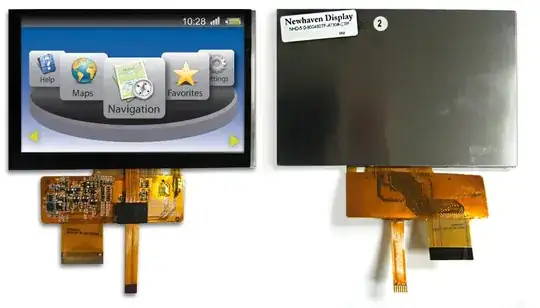
Take a look at NHD-5.0-800480TF-ATXI#-CTP from Newhaven Display, it may be what you are looking for.
It includes a controller with I2C interface and it seems fairly simple to use.

enter image description here

Bruno Ferreira
  • 4,468
  • 2
  • 25
  • 37
  • although helpful this site is intended to help people in the long term, please instead explain how you would go about finding a screen. – Kortuk Jul 01 '12 at 14:28
  • Just edited the answer. – Bruno Ferreira Jul 01 '12 at 16:07
  • that looks like a great start. It lets me know about the decisions involved in capacitive versus resistive, how about choosing past that point. As you edit please note at 10 it will make your answer CW, at that point just flag us and we can remove it. I would like to know more about how you found the screen having already made your capacitive choice. – Kortuk Jul 01 '12 at 16:10
  • Actually I never had the need to use touch screens in my projects so I'm not an expert on touch screens. I found this screen because I've been working with other displays from the same manufacturer and a few months ago I got a notification about these new displays and I thought it would fit Ryl requirements. – Bruno Ferreira Jul 01 '12 at 16:32
  • Dont have to be an expert to answer how to find one. Might be interesting for you to research, might not, that is your choice, I gave you a +1 for putting some decent effort into it. – Kortuk Jul 01 '12 at 16:34
  • I want to help your formatting to make your answer jump out more but I am having formatting block so I will just have to try to check in later. – Kortuk Jul 01 '12 at 16:41
  • Thanks, I appreciate your help. English is not my main language so any help is welcome. – Bruno Ferreira Jul 01 '12 at 16:50
  • Your communication is very clear, I just wanted to pretty it up, more of being used to SE thing. – Kortuk Jul 01 '12 at 16:52
  • Thanks a lot, Bruno, for your answer (and thanks Kortuk for your useful comments). This screen is exactly what I need. I just took the 3.5" version for integration in a small robot. – Ryl Jul 04 '12 at 09:47