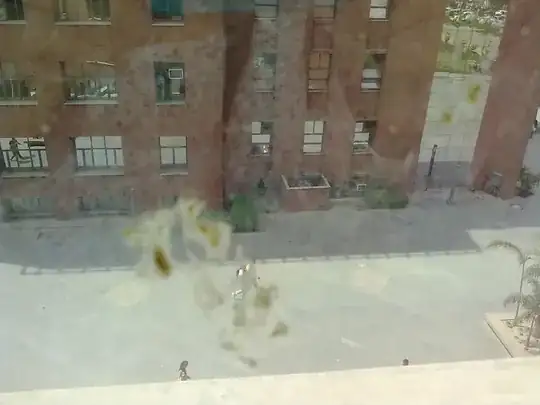
This is not a complete and crisp answer however, i am leaving you with at least some approach for you to fight with. (I would be very glad to know if you have results).
Take a look at these questions:
Removing Glare from Image
How to remove the glare and brightness in an image (Image preprocessing)?
They are essentially trying to solve the same problem.
There are two parts of the problem,
a. Identifying the spot/stain
b. Replacing the stain with what would have been in the place of occlusion.
The nature of the question is trying to solve exact problem (in some sense).
This is not trivial thing. However, in both questions there are some unique pattern that you can exploit.
In all cases, the superimposing element which is required to be removed called here as (stain, glare, bright spot), overlay has a unique and distinct hue/color which distinguishes itself from regular objects/scene.
In most cases, this hue/color of the overlay fades away into the regular scene. The actual resultant color does change - however, it is better to model overlay as single intensity and color with successively reducing transperency Hence you can say resultant pixel
$$P[x,y] = (1-\alpha[x,y])*S[x,y] + \alpha[x,y] * OverlayHue $$
$$\tilde S[x,y] = (P[x,y] - OverlayHue * \tilde \alpha[x,y])/(1-\tilde \alpha[x,y]) $$
where $P[x,y]$ is observed image, and $S[x,y]$ is desired occlusion free image.
Note, that alpha can be arbitrarily varied over pixels, but $OverlayHue$ of overlay is considered almost constant. $\tilde S[x,y]$ and $\tilde \alpha[x,y]$ are estimated values by your algorithm for the respective quantities.
The OverlayHue value can be independently estimated by manually segmenting pixel regions where Stain or Flash is clearly dominating.
You can assume that \alpha[x,y] is consistent across all channels (i.e. R,G,B) . Hence you can identify individual components as follows:
$$\tilde S_R[x,y] = (P_R[x,y] - OverlayHue_R * \tilde \alpha[x,y])/(1-\tilde \alpha[x,y]) $$
$$\tilde S_G[x,y] = (P_G[x,y] - OverlayHue_G * \tilde \alpha[x,y])/(1-\tilde \alpha[x,y]) $$
$$\tilde S_B[x,y] = (P_B[x,y] - OverlayHue_B * \tilde \alpha[x,y])/(1-\tilde \alpha[x,y]) $$
You can see that when $\alpha$ is close to 1 implies that overlay is completely occluding the scene and hence no estimate of $\tilde S$ can be good, you should avoid that and keep some reference value to iterate it over time.
You still have more variables than equation unfortunately, and that is due to the physical nature of pixels. A given color could have resulted either due to the pixel's own property or due to stain/glare. Best bet is that you start with identified pixels where you know that $\alpha$ is 1 and then gradually decay down guess for $\alpha$ reducing successively. Over some iteration you can find the patterns.
Also, in order to finally estimate pure black spots, You can also apply smoothing constraint over neighborhood pixels (i.e. $\tilde S[x,y]$ as well as $\tilde \alpha[x,y]$).
This may not be perfect solution, but may be better than most obvious than pixel level clipping or playing around with saturation etc. I sincerely request you do try this in your end and show us results (my workbench is currently in a mess so i couldn't do it!)
Hope this helps.