0

We have an Excel spreadsheet that uses a Data Connection to a SQL Server database. The database server is joined to our domain, and Windows Authentication is enabled.

Here is a sample of the connection string (with revealing info obfuscated):

Description=DataConnection;DRIVER=SQLServer;
SERVER=10.x.y.z;UID=domain_user;Trusted_Connection=Yes;
APP=Microsoft Office 2010;DATABASE=DatabaseName

And the Authentication Settings are set to "Windows Authentication"

This works perfectly fine from a domain-joined / trusted machine. It doesn't even ask for credentials; it just works flawlessly when I hit Refresh.

It will work from a non-domain / un-trusted workstation, if I use SQL Authentication. But we are trying to move away from that.

Likewise, it will from a non-domain machine using Windows Authentication if I use "runas" to launch Excel with domain credentials, as follows:

runas /netonly /user:domain\user %path-to-excel%\excel.exe

However, using "runas" is a kludge, and our employees will almost certainly have issues... even if I were to create batch files to help automate it.

When launching Excel normally (without using "runas") from a non-domain machine, it gives this error when I hit Refresh:
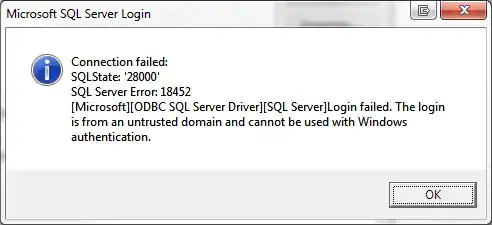
img1

Upon hitting OK, I have the option to un-check "Use Trusted Connection" and manually enter a user/password. I put in a valid user that would be able to connect fine from a domain-joined machine, or that worked fine using "runas". This is the error it gives with that:

img2

At this point, I have not a clue what to do to get Excel to successfully connect with domain credentials from a non-domain machine.

Ideas?

marc_s
  • 8,932
  • 6
  • 45
  • 51
ltwally
  • 113
  • 1
  • 1
  • 5
  • 3
    I don't know of a situation where I'd want a device not attached to our domain to access my SQL servers. That's why we use VPNs for machines that are not permanently attached to the domain. Someone may have a better answer for you but what happens if someone's personal laptop gets stolen and they have that excel spreadsheet on their desktop? You've now opened up a potentially large security hole and whomever has that laptop now has 100% direct access to your SQL instance, even worse if it's a user with some elevated privs. VPNs usually require 2 factor authentication for this very reason. – Kris Gruttemeyer Mar 26 '15 at 18:13
  • I second Kris on this one. Once you un-check 'Use Trusted Connection' you're not going to be able to use domain creds to connect. Either have the users run a script that requires them to launch via logging into the domain, or settle for a SQL Login. VPN is the way to get around all these issues most elegantly though. – LowlyDBA - John M Mar 26 '15 at 18:44
  • We want to use Windows auth, without saving their domain credentials, on remote/laptop users for exactly that security concern. Joining the laptops to the domain is currently not an option. VPN tunnels are used. The question remains: is it possible to get Excel to use Windows/Domain Authentication from an un-trusted (ie. non-domain) system? If so, how? Or, is Excel limited to only using inherent application rights for Windows Auth? – ltwally Mar 26 '15 at 19:40
  • If you don't want to store the credentials (Windows Credential Manager can do this) then no. However, if you are willing to store them in WCM then the answer would be yes. – Mister Magoo Mar 26 '15 at 23:21
  • @MisterMagoo I have not been successful with that method, either. Can you confirm that you have successfully used WCM to do this? – ltwally Mar 26 '15 at 23:55
  • @itwally yes, every day. See this other post http://dba.stackexchange.com/a/66022/26409 – Mister Magoo Mar 27 '15 at 07:14
  • @MisterMagoo Unfortunately we were unable to get WCM to work for us. It does fine storing credentials for remote desktop and remote folders... but did not do the trick for running Excel. Even if it didn't pan out, I appreciate your idea. Thank you for taking the time to reply. – ltwally Mar 30 '15 at 18:37
  • Shame you couldn't get it to work, it does work for any application that connects to SQL using windows credentials but can be tricky to get right. – Mister Magoo Mar 30 '15 at 23:27
  • @MisterMagoo can you confirm that you are using this method with MS Excel (and not just SSMS), and that your excel data connection string is specifying the IP address (and that your WCM store is specifying the IP address) and not using DNS names? – ltwally Mar 31 '15 at 15:44
  • @Itwally - I am not sure I have used it with ip addresses, but can try that tomorrow (it's coming up to 1am now) – Mister Magoo Mar 31 '15 at 23:42
  • @Itwally I have now checked and it works with IP address, but only if that ip address can be resolved to a name and you have used that name in the WCM store, so the answer seems to be NO to your specific case, sorry. – Mister Magoo Apr 01 '15 at 11:34
  • @MisterMagoo even setting up an entry in the hosts file, this did not work with Excel. As far as I can discern, this flat out does not work. Perhaps from a trusted source... but not from outside the domain. – ltwally Apr 01 '15 at 19:20
  • Shame for you, like I said, it can be tricky. When you tried the hosts file, did you use the exact same name in WCM as hosts - matching the case? I can confirm that as long as that name resolution works and the case matches, it can work, but obviously that doesn't help you when yours doesn't work. RunAs is definitely simpler to get working... – Mister Magoo Apr 01 '15 at 22:37

2 Answers2

1

Our solution ended up being ShellRunas.

https://technet.microsoft.com/en-us/sysinternals/cc300361.aspx

By creating custom shortcuts to launch Excel using the /netonly switch, we can have them enter their domain credentials and then open the needed spreadsheets. It's not 100% transparent, but it's good enough.

ltwally
  • 113
  • 1
  • 1
  • 5
0

You need to let SQL Server know the username and password, of the people that are going to use the database connection. However, that is risky as people leave orgs and positions change and security clearances change.

Create a dedicated READ-ONLY user (assuming no data changes required from Excel to SQL Server), in SQL Server, that has DBREADONLY priveleges to the database. Then change the credentials on your Excel data connection to refer to the single user created.

Finally, for this to work, you'll need to let Excel know that it "trusts" the SQL Connection to an external data source, via FILE -> Options etc. This last bit has to be done on every Excel on-prem installation. If Excel is running off the cloud, it gets trickier, as you'll need to setup Connectors to your database server.

Fandango68
  • 295
  • 2
  • 11