I use SQL Server Mangagement Studio to examine the definition of objects in my database.
For example, to examine the definition of the table dbo.MSreplication_options in the master database, I would right-click on the table in the Object Explorer and choose 'Script Table as... > CREATE to > New Query Editor Window...'.
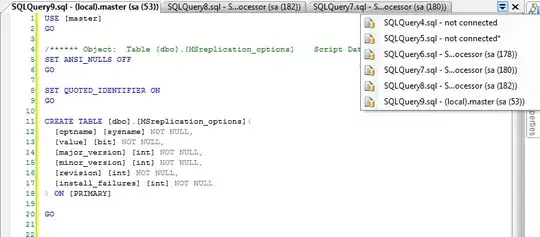
As you can see from the screenshot of the current state of my Management Studio, a new tab is created for a new script called "SQLQuery9.sql", which contains the table definition.
By this time I have already examined a few other objects in this way, and have forgotten what most of the other scripts called "SQLQuery1.sql", "SQLQuery2.sql" and so on contain.
How can I configure management studio give the script a more descriptive name, perhaps containing the name of the object, like "dbo.MSreplication_options.sql", for example.
My Management Studio version is 10.0.5500.0.


CREATE TABLEstatement. Did you mean 'tab'? Is there no way to set the pattern by which Management Studio names the new files it creates? – Iain Samuel McLean Elder Nov 24 '11 at 09:59