Use the DATE_FORMAT function
SELECT DATE_FORMAT(datetimeout,'%H:00:00') ExitHour,count(*) VehicleExitCount
FROM to_leaveveh
WHERE datetimeout >= ('2014-09-01' + INTERVAL 0 SECOND)
AND   datetimeout <= ('2014-09-01' + INTERVAL 1 MONTH - INTERVAL 1 SECOND)
GROUP BY DATE_FORMAT(datetimeout,'%H:00:00');
or
SELECT DATE_FORMAT(datetimeout,'%H:00:00') ExitHour,count(*) VehicleExitCount
FROM to_leaveveh
WHERE datetimeout >= ('2014-09-01' + INTERVAL 0 SECOND)
AND   datetimeout <  ('2014-09-01' + INTERVAL 1 MONTH + INTERVAL 0 SECOND)
GROUP BY DATE_FORMAT(datetimeout,'%H:00:00');
Give it a Try !!!
UPDATE 2014-09-22 08:26 EDT
The queries I gave break down each by our hour of the month. You get no more than 24 rows.
If you want group by date and hour, then try this
SELECT DATE_FORMAT(datetimeout,'%Y-%m-%d %H:00:00') ExitHour,count(*) VehicleExitCount
FROM to_leaveveh
WHERE datetimeout >= ('2014-09-01' + INTERVAL 0 SECOND)
AND   datetimeout <= ('2014-09-01' + INTERVAL 1 MONTH - INTERVAL 1 SECOND)
GROUP BY DATE_FORMAT(datetimeout,'%Y-%m-%d %H:00:00');
or
SELECT DATE_FORMAT(datetimeout,'%Y-%m-%d %H:00:00') ExitHour,count(*) VehicleExitCount
FROM to_leaveveh
WHERE datetimeout >= ('2014-09-01' + INTERVAL 0 SECOND)
AND   datetimeout <  ('2014-09-01' + INTERVAL 1 MONTH + INTERVAL 0 SECOND)
GROUP BY DATE_FORMAT(datetimeout,'%Y-%m-%d %H:00:00');
Give it a Try !!!
UPDATE 2014-09-22 15:07 EDT
This will group by date and hour with a summary by date and an overall summary
SELECT
    IF(
        ISNULL(dt)+ISNULL(hr)=2,'Monthly Total',
        IF(ISNULL(hr)=1,CONCAT('Total for ',dt),HOUR(hr))
    ) Statistic,VehicleExitCount
FROM
(
    SELECT
        DATE(datetimeout) dt,
        DATE_FORMAT(datetimeout,'%Y-%m-%d') hr,
        COUNT(*) VehicleExitCount
    FROM to_leaveveh
    GROUP BY dt,hr
    WITH ROLLUP
) A;
Give it a Try !!!

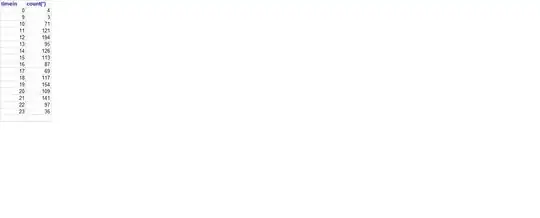 I work in a parking company. We need a report of monthly vehicle exits by time.


