8

I normally use SQL Server but for this project I'm having to learn DB2. If I can get the below code to work I'm set for the whole project. Below is a elementary example of what I cannot get to work. All I want to do is make a Created Global Temp Table (CGTT) and append data to it. The same code below will work if I use a Declared Global Temp Table, but for my purposes I must have a CGTT.

CREATE GLOBAL TEMPORARY TABLE TEST_TBL(
    KEY_ID BIGINT,
    SOMETEXT VARCHAR(10)
);

INSERT INTO USERID.TEST_TBL
VALUES(123456,'TEST TEST');

SELECT * FROM USERID.TEST_TBL;
SELECT COUNT(*) FROM USERID.TEST_TBL;

The above executes fine with no errors. When the insert is executed it even tells me "1 row updated". However, the select * and count(*) both give me 0 results; I'm wondering if this is a permissions issue, but can I have permissions to create a CGTT but not insert to it??

Any help provided would be most appreciated. Thanks in advance.
3 Answers3

11

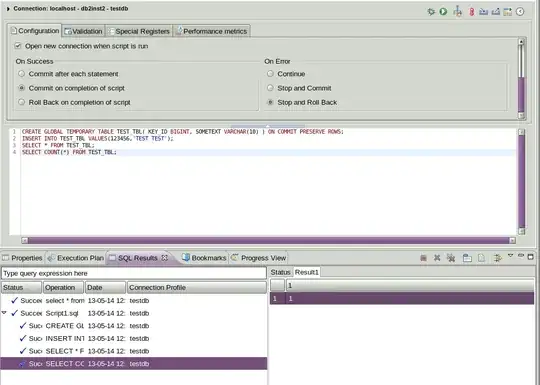
By default the global temporary tables are created with the option ON COMMIT DELETE ROWS. Whatever tool you are using to run your statements must have the autocommit option turned on, so as soon as you issue the INSERT statement it is committed, thus deleting rows in the table.

You should either create the table using the ON COMMIT PRESERVE ROWS option, or disable autocommit while running your commands and issue an explicit COMMIT when you are done. Which option you choose depends on your business logic.

Screenshot of successful execution

mustaccio
  • 25,896
  • 22
  • 57
  • 72
  • Works for me. You're probably executing the entire script as a single statement, which obviously won't work. Did you change the statement terminator character defined in Data Studio, by chance? – mustaccio May 14 '13 at 15:26
  • Thx 4 the quick response. I'm using IBM Data Studio 3.2. Code is now:

    CREATE GLOBAL TEMPORARY TABLE TEST_TBL( KEY_ID BIGINT, SOMETEXT VARCHAR(10) ) ON COMMIT PRESERVE ROWS;

    INSERT INTO USERID.TEST_TBL VALUES(123456,'TEST TEST');

    SELECT * FROM USERID.TEST_TBL; SELECT COUNT(*) FROM USERID.TEST_TBL;

    I receive error: "ILLEGAL USE OF KEYWORD ON. TOKEN WAS EXPECTED. SQLCODE=-199, SQLSTATE=42601, DRIVER=3.64.106"

    I unchecked "Commit Changes to the database after running" under SQL Development->Routines->Process under preferences.

    Am I doing something wrong where I entered ON COMMIT?

    –  May 14 '13 at 15:26
  • You should not be running this as a routine, because it's not a routine. Execute the statements in the SQL Editor. – mustaccio May 14 '13 at 15:27
  • Just checked and statement terminator is still ";" I changed the commit option is preferences back and it still errors out where the ON COMMIT is –  May 14 '13 at 15:30
  • I don't believe I'm running it as a routine, (forgive me this is only day 3 on Data Studio) I selected SQL or XQuery option to create. –  May 14 '13 at 15:36
  • I rarely use Data Studio myself. This will surely work: switch to the Data Source Explorer view, right-click on the database you want, select "Connect". Right-click on it again once connected, select "New SQL Script". Paste the commands into the editor. Change the autocommit option. Click the Run button. – mustaccio May 14 '13 at 15:40
  • Tried this as well, exactly the same. Also tried it in the command editor. I'm going to have the DBA check the permission on my user id and see it that reveals anything. –  May 14 '13 at 16:06
  • Adding a screenshot to show that the script does run as expected. Can't tell what you may be doing differently in Data Studio. – mustaccio May 14 '13 at 16:25
  • Thanks for all your help mustaccio. I have the exactly what you have and it gives me an error. At least the command editor, unlike Data Studio, tells me the version of DB2 is too old to do it. I'm going to open a help desk ticket with my company and see if they can check the permissions or get me a tool that will work. Again, thanks for the help, time, and effort. –  May 14 '13 at 17:36
  • What error exactly are you getting from the command editor? And what is "command editor", by the way? Is it one of the old generation tools, from the Control Center breed? From the Data Studio error it looks like it fails to recognize the statement because all four statement seem to be lumped together. I would double-check the statement terminator character... – mustaccio May 14 '13 at 17:53
2

Please try using following steps

[db2inst9@jaimatadi ~]$ db2 "DECLARE GLOBAL TEMPORARY TABLE DEP6 LIKE V_TOTAL_SALES
> ON COMMIT PRESERVE ROWS
> WITH REPLACE
> NOT LOGGED
> IN USER_TEMP_TBSP"
DB20000I The SQL command completed successfully.
[db2inst9@jaimatadi ~]$ db2 "insert into SESSION.DEP6 select * from V_TOTAL_SALES""
> "
DB20000I The SQL command completed successfully.
[db2inst9@jaimatadi ~]$ db2 "select * from SESSION.DEP6"

COUNTRY              CITY                 SALES_AMT
-------------------- -------------------- ---------------------------------
UK                   London               2100.00
UK                   Manchester           1290.00
USA                  Alaska               2130.00
USA                  California           1420.00
USA                  Los Angeles          1110.00
USA                  New York             1420.00

Thanks, Prashant

Lennart - Slava Ukraini
  • 23,240
  • 3
  • 32
  • 69
Prashant
  • 21
  • 1
0

Are you sure you have only one table? I mean, it seems that you create a table TEST_TBL without schema (taking current/default schema), and you are accessing USERID.TEST_TBL. Probably, the current schema for TEST_TBL is not USERID, and you already have a second table with tha name (USERID.TEST_TBL) that is empty.

For declared temporary tables, the schema is SESSION. For created global temporary tables, it seems it has a specific schema.

AngocA
  • 575
  • 5
  • 17
  • AngocA - I've tried adding the schema to the create statement as well with exact same results. I just moved this over into the Command Editor turned off the auto commit and added a commit after the insert. And still the same results. I'm thinking there's a permission setting that will allow me to create but not insert. Is that possible? –  May 14 '13 at 16:02
  • Even if the CREATE was happening in a different schema, the INSERT and the SELECT statements are qualified to the same place, therefore the same table. So multiple tables do not explain why the SELECT does not show the results of the INSERT – WarrenT May 14 '13 at 22:51