run this query on your server
SELECT [NAME],
       RECOVERY_MODEL_DESC,
       LOG_REUSE_WAIT_DESC,
       IS_PUBLISHED,
       IS_MERGE_PUBLISHED,
       is_subscribed
FROM SYS.DATABASES
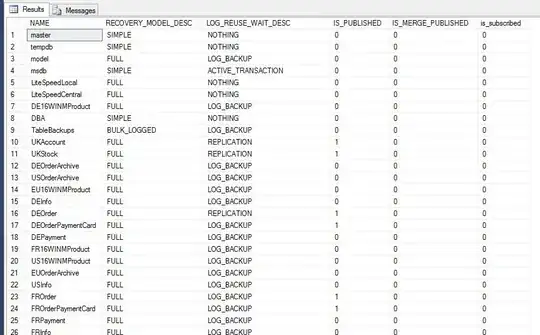
if you have something different than NOTHING in the LOG_REUSE_WAIT_DESC there is where I would start investigating.
There are eight reasons SQL Server might report when it cannot truncate the transaction log
That is probably what is preventing the space within the log to be re-used.
For ACTIVE_TRANSACTION
I like to use the stored procedure called sp_whoisactive it will tell you what is currently running on your server.
or much simpler, just to see if there are open transactions:
DBCC opentran WITH NO_INFOMSGS
For LOG_BACKUP
Why is log_reuse_wait_desc saying LOG_BACKUP after doing a log backup?
LOG_BACKUP really means “either you need to take a log backup, or the
log records that were backed up were all in the current VLF and so it
could not be cleared.”
There are eight reasons SQL Server might report when it cannot truncate the transaction log
If your database recovery model is "full" SQL Server cannot reuse
virtual log files unless all contained transaction log records have
been backed up with a log backup. If a log backup is outstanding the
log has to grow to accommodate new data changes. During this time you
will see a log_reuse_wait_desc of LOG_BACKUP. Full or differential
backups do not backup all transaction log records, so you need to run
an actual log backup to allow for virtual log file reuse.
In this situation transaction log backups every minute I think it too high.
Find the number of VLFs in the transaction log.
I had this situation:
MY_DB (232 Gb) = 500,000 VLFs
and this is what I did (keeping each VLF = 8GB):
dbcc sqlperf(logspace)
go
use my_db
Go
select size/128,* from sys.sysfiles
dbcc loginfo('my_db')

-- updated my_db autogrowth to 4096Mb (chunk of 4 Gb)
DBCC SHRINKFILE(my_db_log, 1)
select size/128,* from sys.sysfiles


ALTER DATABASE [MY_DB] MODIFY FILE ( NAME = N'my_db_log', SIZE = 8GB )
ALTER DATABASE [MY_DB] MODIFY FILE ( NAME = N'my_db_log', SIZE = 16GB )
ALTER DATABASE [MY_DB] MODIFY FILE ( NAME = N'my_db_log', SIZE = 24GB )
ALTER DATABASE [MY_DB] MODIFY FILE ( NAME = N'my_db_log', SIZE = 32GB )
ALTER DATABASE [MY_DB] MODIFY FILE ( NAME = N'my_db_log', SIZE = 40GB )
ALTER DATABASE [MY_DB] MODIFY FILE ( NAME = N'my_db_log', SIZE = 48GB )
ALTER DATABASE [MY_DB] MODIFY FILE ( NAME = N'my_db_log', SIZE = 56GB )
ALTER DATABASE [MY_DB] MODIFY FILE ( NAME = N'my_db_log', SIZE = 64GB )
ALTER DATABASE [MY_DB] MODIFY FILE ( NAME = N'my_db_log', SIZE = 72GB )
ALTER DATABASE [MY_DB] MODIFY FILE ( NAME = N'my_db_log', SIZE = 80GB )
ALTER DATABASE [MY_DB] MODIFY FILE ( NAME = N'my_db_log', SIZE = 96GB )
ALTER DATABASE [MY_DB] MODIFY FILE ( NAME = N'my_db_log', SIZE = 104GB )
ALTER DATABASE [MY_DB] MODIFY FILE ( NAME = N'my_db_log', SIZE = 112GB )
ALTER DATABASE [MY_DB] MODIFY FILE ( NAME = N'my_db_log', SIZE = 120GB )
ALTER DATABASE [MY_DB] MODIFY FILE ( NAME = N'my_db_log', SIZE = 128GB )
ALTER DATABASE [MY_DB] MODIFY FILE ( NAME = N'my_db_log', SIZE = 136GB )
ALTER DATABASE [MY_DB] MODIFY FILE ( NAME = N'my_db_log', SIZE = 144GB )
ALTER DATABASE [MY_DB] MODIFY FILE ( NAME = N'my_db_log', SIZE = 152GB )
ALTER DATABASE [MY_DB] MODIFY FILE ( NAME = N'my_db_log', SIZE = 160GB )
ALTER DATABASE [MY_DB] MODIFY FILE ( NAME = N'my_db_log', SIZE = 168GB )
ALTER DATABASE [MY_DB] MODIFY FILE ( NAME = N'my_db_log', SIZE = 176GB )
ALTER DATABASE [MY_DB] MODIFY FILE ( NAME = N'my_db_log', SIZE = 184GB )
ALTER DATABASE [MY_DB] MODIFY FILE ( NAME = N'my_db_log', SIZE = 192GB )
ALTER DATABASE [MY_DB] MODIFY FILE ( NAME = N'my_db_log', SIZE = 200GB )
ALTER DATABASE [MY_DB] MODIFY FILE ( NAME = N'my_db_log', SIZE = 208GB )
ALTER DATABASE [MY_DB] MODIFY FILE ( NAME = N'my_db_log', SIZE = 216GB )
ALTER DATABASE [MY_DB] MODIFY FILE ( NAME = N'my_db_log', SIZE = 224GB )
ALTER DATABASE [MY_DB] MODIFY FILE ( NAME = N'my_db_log', SIZE = 232GB )
ALTER DATABASE [MY_DB] MODIFY FILE ( NAME = N'my_db_log', SIZE = 240GB )
Transaction Log VLCs - each is a multiple of 4GB




How many rows do you get back? how many of those rows have a Status of 0? This will tell you how much of your t-log SQL Server thinks is still in use
– Stuart Moore Aug 26 '16 at 10:57