7

I mostly commute and have never had trouble climbing a hill sometimes by using my lowest speeds (or close to them).

How do I evaluate even roughly what grave %age I climbed?

What I mean is that I would love to tour someday in a real mountain-y region, and would like to know how to approach climbs like this.

For example, I see profiles with %ages as high as 10%. I know I never rode 10km at 10% but how does 10% look like? how do I know I won't be forced to give up after the first mile or two?

How about 5%? 7%? or the extreme 12.5% I see on some climbs?

I do have a GPS device that gives a reliable path of where I've ridden, but the altitude is not reliable to the profiles of my rides are not either.

ptpdlc
  • 1,942
  • 2
  • 17
  • 27

3 Answers3

7

There are various web sites that might help.

I use one called http://ridewithgps.com. You need to register on it but you can get quite a lot from a free account.

Does your GPS device output GPX files? If so, I think Ride With GPS can suck them in. If not you might have to put your route into the site manually (but this is easy enough).

But what you do get on your route is a display of the gradient (you hover over different parts of the route to see it).

For example, I did a quick ride yesterday afternoon, here it is:

RideWithGps screenshot

I have a pay account with these people but I'm fairly sure you get this page with the free account too.

Any good to you?

Just added another image - didn't realise SE was going to reduce the main one so much. This is just a zoom of the bit with the tooltip. Note also the blue dot in the corner - this is the location on the google map which corresponds to the crosshairs on the elevation plot.

RideWithGpsZoom

PeteH
  • 9,733
  • 5
  • 33
  • 53
  • 2
    Strava is another popular site that you can upload your GPX file too. They offer quite a bit for free but also have some advanced features for those willing to pay for a membership. – Kibbee May 16 '13 at 18:15
  • @Kibbee do you use Strava? do you like it? I was pointed to it by someone but what he said gave me the impression that it was mainly used to race against your mates. That put me off a bit. – PeteH May 16 '13 at 18:22
  • 1
    I do use Strava and like it. They do kind of put an emphasis on comparing you against others, which can be both fun, if not a little demoralizing. They break up your ride into different sections that allow you to see how your time compares to others who have done the same climb. You can just ignore the standings if you want. – Kibbee May 16 '13 at 18:32
  • 1
    MapMyRide is a good resource as well. You just need to create a free account in order to create routes. – sevargdcg May 16 '13 at 18:34
  • 1
    I use Strava a lot and agree with what @Kibbee says about the emphasis on comparing to others, but within these 'leader boards' you can select to just show just your rides on each segment to see how you have improved over time. Additionally, you can change your default view settings to default the leader board to All, people you follow, or even a club. If you don't follow anyone, you can set the default view to basically show no one else but your ride time for each segment. – Glenn Gervais May 16 '13 at 19:07
  • It's possibly also worth saying that some cycle computers will tell you the gradient in almost real time, and display it while you're riding. I know the Garmin 800 does this but that's a very big investment. How accurate it is I don't know, its not something I pay attention to on the road - on climbs I normally just shut my eyes! – PeteH May 16 '13 at 19:20
  • Actually I do use ridewithgps and record all my rides on it. I just have serious doubts on the figures it gives. My best example is a 1 km long piece of my daily commute, it is a slight slope, when going down I always reach ~45 kmh (to give you a slight idea of how steep it is). ridewithgps shows -2% and when going the other way (commuting home) shows 4% at the same place! Another example, ridewithgps tells me that this is 3%: http://goo.gl/maps/zlngU – ptpdlc May 16 '13 at 21:49
  • I have an Oregon 450 which is a lot cheaper than a Garmin 800, and it gives me readouts of meters/minute or meter/sec as my "climbing speed". It has a barometer in it, so it's supposed to be more accurate than just GPS for altitude. I'll have to keep an eye on that next time I'm doing a climb to see how well it works. – Kibbee May 17 '13 at 01:32
  • @tisek - that's funny, I started using RideWithGPS after I plotted a course on another site (not one mentioned here so far), and the site said the route had 1500m climbs. When I rode the route it was actually 2200m according to my Garmin (barometric altimeter, seems to be quite well thought of in the Garmin forums). Anyway I was told about rideWithGPS so I went there and plotted the route I'd ridden - and it said 2200m and I was sold... – PeteH May 17 '13 at 05:30
  • Barometric GPS (such as the Garmin Edge 500 has) can vary wildly as the weather (pressure) changes. It's usually OK relative to the start of a ride, but yesterday it had me at the same point 190m @ 8am and 300m @ 5pm. Usually you can manually set them to a known start point, if you can be bothered. – James Bradbury May 17 '13 at 11:46
  • @JamesBradbury does this imply then that (over a short enough timeframe) the computers could get absolute altitude values wrong, but should get relative values right? If this were the case then gradient values should be reliable shouldn't they? And surely the GPS chip will have a view on the altitude? I wonder if the computers use this value at all? – PeteH May 17 '13 at 12:21
  • Pressure based altitude can give you better incline numbers than gps based. The pressure change is irrelevant over the small bit of the ride that is used for incline. The incline number is liable to be for a length of road rather than instantaneous e.g. say the last 100m which is probably good enough for this context. – Ifor May 17 '13 at 13:01
5

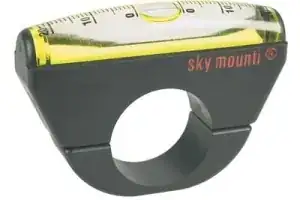
Get a Sky Mounti inclinometer:

enter image description here

Not terribly accurate, and not much use on rough pavement, but it gives you an immediate readout that doesn't "smooth over" the ups and downs the way that maps will.

(I should state that it has a problem on level ground -- the faster you go (especially on rough pavement) the higher it reads. But get on a grade over 4-5% and it seems to be fairly stable & reproducible.)

Daniel R Hicks
  • 53,604
  • 3
  • 83
  • 194
0

I use a Garmin Edge500. I upload to the Garmin website, and the site shows a gradient map of the ride, among other things. The grade and altitude measures do have some error. But I can also monitor this during the ride and get a better idea of what various grades feel like.

As an example of inaccuracy, a bunch of us who did the Santa Fe century on Sunday reported total climbing figures between 4700 and 5700 feet but clustering around 5300. Maximum measured grade was 16% on the agonizing Heartbreak Hill, which seemed endless.

Your gearing will probably make more of a difference than your slope measures. If in doubt, get the biggest freewheel cluster your derailleur will handle.

JKP
  • 402
  • 3
  • 6