47

I have a MacBook Pro running OS X Yosemite (10.10.3). I connected my Arduino UNO R3 to my computer for the first time after the Yosemite upgrade - it worked fine before this!

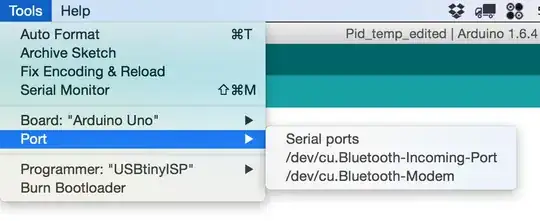
When I opened the Arduino IDE I selected Tools > Board > "Arduino UNO", but when I try to choose a Serial Port the only options are:

/dev/tty.Bluetooth-Incoming-Port
/dev/cu.Bluetooth-Incoming-Port
/dev/tty.Bluetooth-Modem
/dev/cu.Bluetooth-Modem

I have followed several tutorials and threads on how to 'fix' this issue, all to no avail:

I've installed the latest version of the FTDI drivers (even though, from what I recall the UNO doesn't even need them): FTDIUSBSerialDriver_v2_3.dmg

Downgraded to a prev. version of the FTDI driver hoping that would clear it up: /Volumes/FTDIUSBSerialDriver_v2_2_18

I followed a tutorial of how to remove the existing Apple drivers and removed the kext files, etc...

Tried connecting arduino to both USB ports.

Tried various cables, including the one that a I used before the Yosemite upgrade.

Tried installing updated Silabs drivers: Arduino compatible's serial port not showing Mac OSX

Walked through the entire Arduino Mac OSX guide: http://www.arduino.cc/en/guide/macOSX

After looking into the system info of my Macbook Pro, I can see the USB Controller is Broadcom based, in case that helps. I searched for Broadcom USB drivers but got hits for Silabs one instead.

Under my Tools > Port menu.. I can see these options: enter image description here clicking the Serial Ports option doesn't do anything.
Running ls -1 /dev/tty.* or ls -l /dev/tty.usb* from terminal gives me:

/dev/tty.Bluetooth-Incoming-Port
/dev/tty.Bluetooth-Modem

The Board does NOT show up under system networking (as it has for others), so it's not recognized as an incorrect device.

I'm at a complete loss. The board powers up... but I cannot connect to it.

SIDE NOTE: This is a legit Uno R3, not a clone.

revive
  • 571
  • 1
  • 4
  • 3
  • If it is a legitimate Uno, then all of the FTDI and SiLabs efforts are an irrelevant distraction at best. Ideally, test the board and cable on an another machine to make sure it has not been damaged in the meantime, and try a different USB port on the Mac (especially try connecting through a keyboard or hub if you tried directly, or directly if you had tried a hub). I believe if you look in system information you can get a listing of all USB devices, which would be good to include in your post. – Chris Stratton May 25 '15 at 19:54
  • That's what I was thinking - regarding the FTDI drivers - but those were the only solutions I could find claiming to 'solve' this issue. I have tried other USB ports on the Macbook and will fire up my Apple keyboard since it has a USB port and reply back. I did write in my post the USB devices recognized in terminal. – revive May 25 '15 at 19:57
  • Ok, tried my Apple YSB keyboard - connecting Uno to USB port === no dice – revive May 25 '15 at 21:11
  • Moved the Apple USB Keyboard back to my iMac and tried to connect to Uno there.. selected Uno from the Board menu and still only shows bluetooth modems from the Serial Port menu. – revive May 25 '15 at 21:14
  • After updating the Arduino app to 1.6.4 the Port menu now shows the same options as my Macbook (shown in the image in Orig. Post) – revive May 25 '15 at 21:19
  • You really should look not just in the Arduino IDE but in system information or whatever they call it (get there from the about this mac, and advanced, etc) and see what USB devices it is seeing. And again, test the board on another machine to make sure it is still good. – Chris Stratton May 25 '15 at 21:48
  • 1
  • I've checked for 'visible' USB devices in both the System Info screen and via the Terminal.. both show the same.. and only bluetooth are present (aside from keyboard and my external HDD). 2) I have now tried this on both my Mackbook Pro and my iMac .. neither of which 'see' the USB connection.
  • – revive May 25 '15 at 22:04
  • Post a complete list of the raw USB (not serial) devices (ie, VID/PID) the system (not IDE) sees connected. – Chris Stratton May 25 '15 at 22:58
  • 1
    I did. I copied the LS from Terminal as well as identified, through the system settings screen, that there are only the USB to Bluetooth, Keyboard and Internal Memory Card controller. I checked both the IDE and the System screen after: 1) changing cables, 2) adding an Apple USB keyboard and using it;s USB port, 3) trying the same sequence on my iMac (keyboard usb and main usb).. nothing. The board is not listed. Period. – revive May 25 '15 at 23:09
  • @ChrisStratton If there is another way to do this, to get the info you're asking for.. please let me know. But at this point, I've looked/checked everywhere that I know how to. – revive May 25 '15 at 23:14
  • Until you have demonstrated that the board still works on some system (at this point probably not a Mac) you will have to consider it to be damaged. – Chris Stratton May 25 '15 at 23:20
  • 1
    Well, looks like the board might very well be shot. I fired up my wifes Windows laptop, installed Arduino, etc.. attached power and USB to Uno and it doesn't show in either the Arduino app or File Explorer. Not sure what/how it happened as the board was stored in an air tight, dry, cool container within a static free bag - the one it shipped it. And, I'd already ran this sketch once to perfection... bummer. Any other thoughts or possibilities? – revive May 26 '15 at 00:07
  • After reading this I just tried out some of my Arduino machines, which worked properly so far, and indeed after upgrading to Yosemite yesterday, now none of my machines and none of my cables are recognized. I suspect a driver incompatibility... – dda Jul 03 '15 at 05:39
  • 1
    I come back to the first question. I think I have the same problem. Basically I tried to install FTDIUSBSerialDriver v2_3.dmg on OS X Yosemite 10.10.5 The installation succeed But if I am looking in the /System/Library/Extensions/ I can see no FTDIUSBSerialDriver.kext if I go ls /dev |grep usbserial no cu.usbserial-A9GBBDLL or tty.usbserial-A9GBBDLL Please help –  Feb 07 '16 at 13:47
  • Just wanted to add that I was having this same issue and switching to a different USB cable worked for me. I did not even know there was such a thing as a power-only USB! – SteveC Dec 13 '15 at 22:22
  • This posted question has shown me the truth after a good 12 hours of absolute bupkis trying to get my V3 to show up in the serial ports. Thank you OP, for the release from hell. – Wowthisishard Jun 13 '17 at 11:26
  • This is the best solution and drivers I've found: https://github.com/adrianmihalko/ch340g-ch34g-ch34x-mac-os-x-driver – IgorGanapolsky Dec 27 '17 at 16:43