2

Since my Mac crashed and does not boot OS X at the moment, I am trying to recover some data from my user folder in OS X from within of Ubuntu.

Usually I have no problem accessing the files. But not this time.

I have stumbled upon these really strange permissions and I cannot change them. What are these?

Using sudo chmod... and sudo chown... is not possible and I get a message saying: (translated) no access possible: input/output error
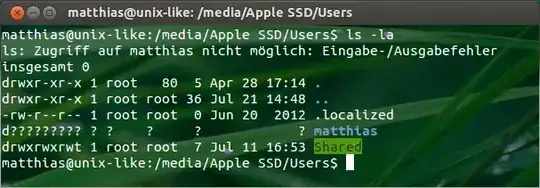
enter image description here

d????????? ? ?    ?     ?            ? matthias
gentmatt
  • 49,722

1 Answers1

2

When you don't have permission to a folder in Ubuntu (and various other Linux OSs), you will get d?????????.

To recursively fix the permissions, use this command:

chmod -R a+rX matthias

From this answer on Ask Ubuntu:

To read a file, its read permission needs to be set. However, to read a directory and the listing of its files, both the read and the execute permissions need to be set. If they aren't, you get weird errors like the ones you're experiencing.

grg
  • 201,078
  • This doesn't explain the ??? @gentmatt is seeing. – nohillside Aug 11 '13 at 11:03
  • @patrix "both the read and the execute permissions need to be set. If they aren't, you get weird errors like the ones you're experiencing." …? – grg Aug 11 '13 at 11:04
  • Is this Ubuntu-specific? I get d--------- for directories I don't have access to under OS X. – nohillside Aug 11 '13 at 11:11
  • @patrix Yes, I believe it is, or at least maybe Linux-specific… My RPi also shows ??? for no permissions when I try to access certain folders on my Mac over the network or drives plugged in (in which case I do a chmod -R a+rX <directoryname>). – grg Aug 11 '13 at 11:15
  • Oh sorry, I should have mentioned that I have tried using chmod and chown with sudo - but it in both cases I get the message: (translated) no access possible: input/output error – gentmatt Aug 11 '13 at 11:50
  • From my understanding of that page, you get this when you don't have execute permissions on the parent directory (Users), not the one showing them. If that were the case, the other contents would also show the same thing. Based on the results of the chmod/chown, I would guess that the drive has failed and the sector containing the info for that directory cannot be accessed. – ughoavgfhw Aug 11 '13 at 18:03
  • @ughoavgfhw I also thought that the drive has failed. But it's working now. Could it be corrupted firmware? I made an appointment at the Genius bar to get it checked out. – gentmatt Aug 11 '13 at 19:47
  • @gentmatt Corrupted firmware would probably make all of the data bad between reading from disk and sending to the computer, but it could be that the data is corrupted on disk. If that is the case, the data could possibly be saved by writing back a valid entry. Don't rule out failure because it seems to be working, though, it could just be a partial failure. A genius bar appointment is definitely a good idea. – ughoavgfhw Aug 12 '13 at 00:30