36

I'm looking for a clipboard manager like Ditto for Mac:

Ditto is an extension to the standard windows clipboard. It saves each item placed on the clipboard allowing you access to any of those items at a later time. Ditto allows you to save any type of information that can be put on the clipboard, text, images, html, and custom formats.

Meaning Ditto can store about 40 items. Ditto has some extra utilities:

  • searching in items
  • parsing plain text
  • keeping images as well
Graham Miln
  • 43,776
Elad Benda
  • 1,602
  • 5
  • 22
  • 27
  • I'm curious if you found the perfect clipboard manager, as I am in the same situation. What I miss in all of them is the ability to search using regular expressions, incredibly useful for filtering batches of entries or finding something I'm not completely sure what it was. – aleation Sep 29 '22 at 09:53

9 Answers9

13

If you just want clipboard history, check out Jumpcut. Manages your clipboard history just fine. To install:

brew install jumpcut

It’s also a common feature in applications like Alfred (as noted by Lauri Ranta), LaunchBar and Keyboard Maestro.

user137369
  • 1,568
robmathers
  • 41,194
  • I have alfred. How do I call Jumpcut from alfred? – Elad Benda Jul 30 '13 at 06:48
  • @EladBenda Jumpcut is a separate program from Alfred, which has its own built-in clipboard history. I don’t use Alfred, but check out this page from the Alfred site that explains how to use the clipboard history. – robmathers Jul 30 '13 at 18:20
  • If you look at the link, you’ll see that Jumpcut is indeed free. – robmathers Jul 31 '13 at 16:35
  • 1
    Already shared on Jumpcut's webpage as well, Maccy is a simple and free alternative which does its job really well. This SO question details it. – Beytan Kurt Jul 30 '21 at 11:05
  • @EladBenda I see where your confusion comes from; the "It" in "It’s also a common feature in applications like Alfred" refers to clipboard management in general, not Jumpcut itself. Alfred, an alternative app to macOS's native Spotlight search and indexing app, has an added feature of managing your clipboard. Hope this helps. – nicheese Apr 04 '22 at 00:30
  • For today: brew install --cask jumpcut – pbies Feb 16 '24 at 23:49
10

The one I've found (Maccy) which is available free (yet if you like it, you should donate as well) and exactly like Ditto, simple and focused.

For details:

  • here is the link to it's official site: Maccy.app
  • github link: Maccy

While deciding on that one, I've searched and tried a couple others but didn't like as much as Maccy:

4

CopyQ is the alternative I've got for my Macs. It supports richtext, images and has search. You can also change the key combination to show the list and choose what to paste without using mouse.

  • Welcome to Ask Different. We are looking for more than a single line answer. It's helpful if you provide supporting documentation, links and/or screen shots to enhance your answer. – Allan Dec 06 '17 at 12:50
4

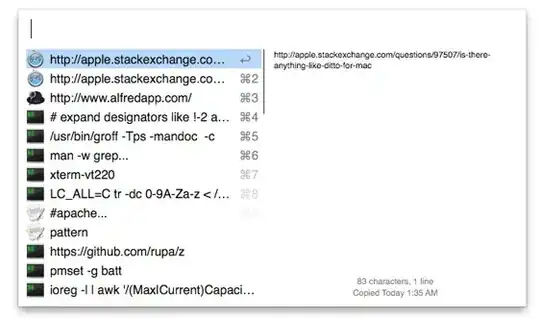
I use Alfred's clipboard history. It's searchable, it can keep history for up to three months, it has a nice keyboard-centered UI, and it doesn't require running other applications on the background. It doesn't support images or rich text, but I mostly work with plain text anyway.

Lri
  • 105,117
3

Try this one out: https://github.com/naotaka/ClipMenu. It's free and you could use shortcuts for it.

2

another one is Flycut which still runs perfectly well in OS10.10.3.

nohillside
  • 100,768
LexS
  • 1,451
1

iClip is a little old, but still works well. I believe the only thing it doesn't do is search in items. Other than that, it does everything you want and more: images, plaintext, stores up to 99 items, etc.

Tortilla
  • 725
0

I just started using quicksilver and it seems to some support for images, but I need it mostly for text. I like that I was able to duplicate Ditto's fast functionality by following this guide.

There's a little bit of setup, but looks like I'm going to be sticking with it for my OS X coding purposes.

Plus it feels good to be back with quicksilver, I remember using it way before spotlight search was any good.

fsb
  • 22,799
sirclesam
  • 101
0

CopyClip is available for free in AppStore

  • 4
    Welcome to Ask Different! We're trying to find the best answers and those answers will provide info as to why they're the best. Explain why you think the software you recommended is better than others out there. Providing links can also help the OP, and others, find the software and evaluate it themselves. See [answer] on how to provide a quality answer. – fsb May 18 '17 at 15:31