55

Periodically, I'm seeing this keychain dialog pop up:
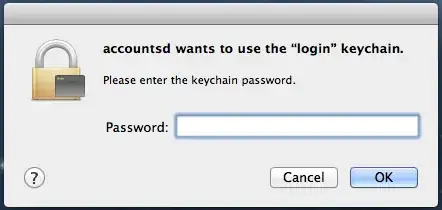
keychain dialog

I click 'Cancel', then it pops up again, then I click 'Cancel' again, and it goes away for a while. (Maybe an hour or two, I haven't timed it.) I haven't noticed anything not working right.

What's going on here?

If it matters, this is OS X 10.8.2.

  • 2
    accountsd is a part of the Accounts Framework. It is probably normal for it to want access to your keychain. Apart from that I don't have a clue, but see the answer below. – Harald Hanche-Olsen Jan 28 '13 at 16:25
  • This problem started with me today, after upgrading to Sierra (10.12.6 16G1710 - the 2018 Dec security update). I also have had similar problems with assistantd since upgrading to Sierra. – benc Dec 11 '18 at 22:56
  • @HaraldHanche-Olsen It's Mac, not some ancient Unix, and it's a user-facing communicate. It refers to a *d (daemon), I'm 99% sure that it isn't meant to be shown to the end user. – cubuspl42 Aug 12 '19 at 14:24
  • @cubuspl42 I don't quite get what you're trying to say here. (Note: this was more than six years ago.) – Harald Hanche-Olsen Aug 12 '19 at 15:55
  • 1
    I meant that for 99% it's not "normal" as in "by design", but rather a bug. I believe that these communicates are meant by Apple to be human-readable, like "Calendar wants to access the "login" keychain". Anything referring to system daemons is unreadable and not understandable by end-users in my opinion. And sadly this is still occurring on the newest version of macOS (10.14.5). – cubuspl42 Aug 13 '19 at 08:08

1 Answers1

12

Open Keychain Access, which can be found in /Applications/Utilities.

Then select Keychain First Aid under Keychain Access.

Enter your password and click to Verify (this is important to find out how is making the problem just in case it comes up again).

If it shows Errors use the Repair function.

In my case it looked like this before the repair.

It found one error and it was fixed after the repair.

enter image description here

Ruskes
  • 48,129
Zo219
  • 2,651
  • 3
    How and why does this stop accountsd from asking for access? – mmmmmm Mar 23 '13 at 14:51
  • 1
    It's not normal for accountsd to ask. If Keychain Repair doesn't fix this, let us know. – Zo219 Mar 23 '13 at 21:39
  • p.s. Keep your Keychains handy by checking the box in Preferences to Show Status in Menubar. – Zo219 Mar 23 '13 at 21:39
  • This didn't fix my issue. I think i caused it myself bu running security -v set-keychain-settings -lut 72000 login.keychain when testing a deployment script that needed Keychain access. How do i reverse this change? – Maciej Swic Feb 19 '15 at 16:01
  • I ran security -v set-keychain-settings --help and i think running security -v set-keychain-settings -t 72000 login.keychain fixed my issue – Maciej Swic Feb 19 '15 at 16:03
  • I have done the repairs you mentioned and i continue to see the "accountsd wants to use the "login" keychain." message, Any idea? when i hit verify it says no problems were found. there is some text in blue though – pau Dec 08 '15 at 22:06
  • 71
    Seems Apple has removed the Keychain First Aid option. – JohnRos Dec 19 '15 at 06:55
  • 8
    Just open the "Keychain Access", click right on the "login" keychain in the sidebar, select "Change settings for Keychain "login"" and unselect both options "Lock after ..." and "Lock when sleeping". – Tom Kraina Sep 08 '16 at 10:55
  • Happened to me when my computer password was changed. Seems that a lot of things in my keychain needed to renew their access or rights after this. – Justus Romijn Mar 31 '20 at 18:25