37

I want know how can I apply a software to open all my same document, for example I want to open all my PDF document with Skim but when I right click on it> open with > other and choose my desired application and check the "Always Open With" it just do for that specific file.(mean always open A.pdf with skim if I want to open B.pdf still open with "preview").

How can I force OS X to open all pdf type with Skim.
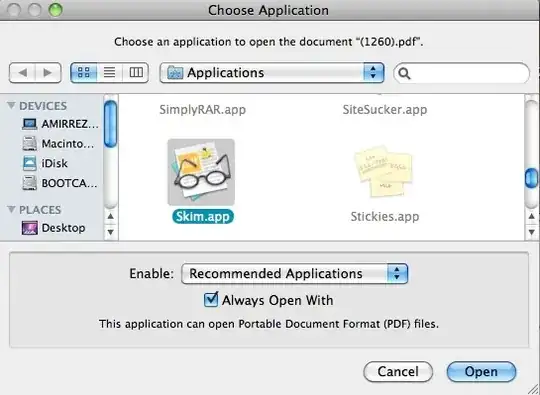
alt text

Jonik
  • 6,673
Am1rr3zA
  • 13,219
  • 14
  • 68
  • 88
  • Out of curiosity, what OS version are you using? 10.6? (this isn't relevant to the question, I'm just a curious dude ;)) – Matt Jun 09 '14 at 23:49
  • this question is too old that time I had snow leopard – Am1rr3zA Jun 10 '14 at 06:45
  • I didn't even know it was the intended behaviour! I thought it was a bug in my Mac that it kept opening XMP with Photos, when I already "told it many times" to open it with XML editor. – texnic Jan 07 '22 at 10:40

4 Answers4

81

From the Finder, select a PDF file, open the Info panel (FileGet Info or I), select your preferred application and then click Change All…

change all

  • 1
    The UI related to changing default documents is misleading. I'm reading this question because I'm seeing this in 10.10.4 -- set TextWrangler as the default (Always Open With) for XML via the Open With... dialog, yet it still wants to open with Xcode. Your fix fixed it. Apple needs to fix this behavior. – jcollum Aug 24 '15 at 14:54
  • 3
    now is 2016 and this answer is still useful, thanks!! – hihell Apr 09 '16 at 18:03
  • 4
    2019... still useful :D – Teddy Apr 26 '19 at 10:43
  • 1
    The "Always Open With" checkbox has never worked for me, either. It's been annoying me for ages. This answer solved my problem. Thanks! – leifericf Jan 09 '20 at 11:48
  • 6
    2020...still useful :) – MIK Feb 06 '20 at 02:19
  • 4
    2021... Still useful. I've been using the "Choose application" for years and it doesn't work, finally stumbled upon this. Solutions which recommend using Automator, Services or editing Info.plist are pragmatically better, but until the OS provides something, this technique is easier to train and support others on. – tresf Jan 28 '21 at 19:58
  • @tresf I wonder why you call other solutions better. Care to elaborate? I find this one the easiest and very straightforward, hence, by Occam's razor, the best. Am I missing something? – texnic Jan 07 '22 at 10:45
  • 1
    @texnic Sorry if my message was confusing. I agree and I believe this answer is still the best. :). – tresf Jan 07 '22 at 15:48
  • 1
    2022... still useful :D – Sergei Kuraksin Dec 01 '22 at 11:17
  • 4
    2023 - still useful :) – Vitalii Vasylenko Feb 08 '23 at 23:47
  • Sep 2023. Still useful! Btw, if you have permissions issue, click the lock icon at the bottom right then unlock permissions and try again! – Arvind K. Sep 10 '23 at 05:04
6

If you want to mess with all filetypes and "who opens what", there is a freeware System Preference Pane called RCDefaultApp that works in Snow Leopard, Leopard, Tiger and Panther.

You can change pretty much any type of resource, for example you can tell that “Acorn” opens png by default or that the default app for the extension “jpg” should be Preview.app, etc.

It also handles MIME types, URLs, and Media.

3

I had this problem today as well (Mavericks) but the solutions here didn't work. This is due to a corrupt services cache. I ran the following command in terminal and things started working again

/System/Library/Frameworks/CoreServices.framework/Versions/A/Frameworks/LaunchServices.framework/Versions/A/Support/lsregister -kill -r -domain local -domain system -domain user

So if anyone the answers don't work for you, run this command and then it should be fine after that

3

Another option is to right click the file in Finder and then change "Open With" to "Always Open With" by holding down the option (⌥) key.

Steve Moser
  • 8,734