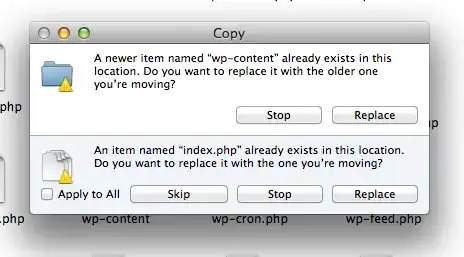
While testing WordPress 3.5, I took the old copy of a site, and copy pasted the 3.5 from the zip file.
Part of a WordPress install is the folder wp-content containing all the uploads and themes plugins etc. This folder now no longer contains all of that stuff because I clicked replace.
How do I replace the files in that folder, not the folder itself? Right now it's the same as deleting that folder and then moving the new folder in its place.
Under Windows, the files in the folder, not the folder itself are replaced, right now i'm lucky I have a backup to copy from but I could very easily have lost that date considering every other platform I use follows one paradigm and OS X another
Some people have suggested I should click on merge, this would be great if I could, but no merge option is provided: