1

When I try and search for something using spotlight, all application results show the .c file extension icon instead of the actual app icon you would expect to see for FireFox, Safari, Mail etc. Very annoying. I have tried Cmd + I to change the file association there, but it does not address the problem correctly. Any ideas?
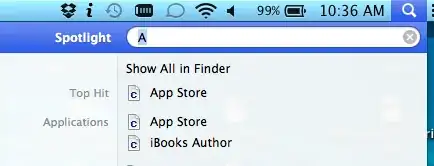
grg
  • 201,078
David
  • 131
  • 6
  • Please post a screenshot. – duci9y Nov 03 '12 at 07:41
  • Sorry, I am a new user and it would not let me post an image. But it does let me post a link. If a few kind users click the up vote, I can post images :) – David Nov 03 '12 at 17:40
  • Oh you’ll ear repo over time, don’t worry :) As for the problem tell me the names of all development applications you have installed (Xcode, etc). – duci9y Nov 03 '12 at 17:55
  • I have Xcode, TextMate, NetBeans, Git Tower, Versions, Dreamweaver, eclipse. I have a few more, but I don't think they help make things more clear. – David Nov 03 '12 at 18:43
  • Wow that’s a lot! One of these apps has probably taken over your LaunchServices database (I don’t exactly recall what it is called). This issue has been addressed many times here, please search for “missing icons” and related search terms. Sorry, I don’t remember the exact commands, but this is a start. :) – duci9y Nov 04 '12 at 10:09
  • It appears that part of my solution is related to clearing spotlight cache and then letting it re-index my drive. So now some icons are displaying correctly, but it seems to reveal another problem. The C file type is actually being displayed as the default icon. Spotlight no longer shows the default icon when it hasn't loaded an icon yet. It may now be mostly a corrupt icon cache of some sort. I will see if I can find a fix for that. – David Nov 04 '12 at 21:45
  • Now that the indexing finished all my icons are wrong again. Probably better off with a reinstall here soon anyhow. – David Nov 05 '12 at 04:01
  • Here, try this command and tell me if it works. If it doesn’t, you are probably better off with a reinstall. /System/Library/Frameworks/CoreServices.framework/Versions/A/Frameworks/LaunchServices.framework/Versions/A/Support/lsregister -kill -r -domain user – duci9y Nov 05 '12 at 09:03
  • Thanks for the attempt. That command seemed to fix a few icons, but several are still being displayed as the "C" file type. Must be a combination of issues and a reinstall is in order. – David Nov 05 '12 at 19:16
  • Reinstall. Only way to go. – duci9y Nov 06 '12 at 14:36

0 Answers0