I am newbie Mac user and I recently stumbled upon this annoying F6 problem: when I debug in Xcode or Eclipse, I must use fn+F6 to run the debugger. By default, F6 is the function key to adjust the keyboard light. How can I reverse its functionality, in order to use F6 for the debugger and fn+F6 for the keyboard light?
Asked
Active
Viewed 2.2k times


3 Answers
60
System Preferences -> Keyboard -> Keyboard tab -> check "Use all F1, F2, etc. keys as standard function keys"
UPDATE: If you have a touch bar Mac you'll want System Preferences -> Keyboard -> Keyboard tab -> "Touch Bar shows" -> "F1, F2, etc. Keys"
UPDATE 2: in macOS Ventura (13.0) the setting has moved to System Settings... -> Keyboard -> Keyboard Shortcuts... (button) -> Function Keys -> "Use F1, F2, etc. keys as standard function keys"

HairOfTheDog
- 1,370
-
it's fantastic!! – dan zen Oct 10 '12 at 05:08
-
1As an added side note. If you use an external keyboard like the magic keyboard from Apple, there is an option called "Use F1, F2, etc. keys as standard function keys" on the same page. This should change this behaviour for external keyboards only. Might only work with Apple keyboards tho. – Nexonus Jul 07 '20 at 11:28
-
Sadly I had set this and forget whappen - had to find out what I did here. – charles ross Aug 17 '23 at 14:46


2
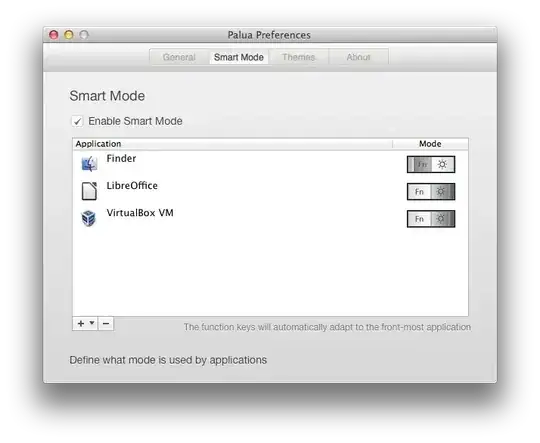
And Paula allows you to set the global F1-F12 vs "special key" mode based on the focused application.

user3442769
- 21