14

Is there a way or a 3rd party application which would let me specify, for example, that I want it to send a keyboard event (so that it has the same effect as physically hitting the key on the keyboard) every 5 seconds?

So, for example, I could tell it to hit K every 5 seconds, 15 times in total?

Basically, I'm looking for something like AutoHotkey but for OS X.

bmike
  • 235,889
houbysoft
  • 9,182

3 Answers3

11

I found a way to do this in a bash script:

#!/bin/sh
# Simulates hitting a key on OS X
# http://apple.stackexchange.com/a/63899/72339

echo "tell application \"System Events\" to keystroke \"$1\"" | osascript

Save as hitkey, chmod +x hitkey, hitkey k to hit K.

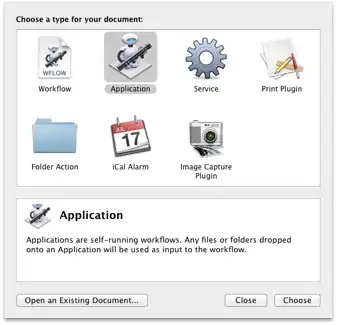
From there it's simple to use Automator to loop over the script several times or make an iCal alarm to initiate the script at a specific time.

Automator document types

Dorian
  • 2,201
  • 1
  • 16
  • 17
houbysoft
  • 9,182
  • Doesn't that miss the whole "repeat every 5 seconds for a total of 15 times" part? – Daniel Sep 13 '12 at 16:35
  • 1
    I didn't know about the echo "script" | osascript syntax - I've always used osascript -e "script". So you get +1 for that. – Cajunluke Sep 13 '12 at 16:53
  • 1
    @DanielLawson: yes, but having the shell script it's simple to loop it however you want. – houbysoft Sep 13 '12 at 17:20
  • I've never used Automator. Would you mind sharing a step-by-step guide? I'd like to repeatedly press Return in a web form. – Adam_G Oct 22 '20 at 14:19
11

Here's an AppleScript to do what you want:

set i to 0
repeat while i < 15
    set i to i + 1
    delay 5
    tell application "System Events" to keystroke "k"
end repeat

You can inline it in a shell script like this:

echo "set i to 0
repeat while i < 15
set i to i + 1
delay 5
tell application \"System Events\" to keystroke \"k\"
end repeat" | osascript

(Thanks to @houbysoft for the echo "script" | osacript syntax!)

Cajunluke
  • 17,704
  • I've never used Automator. Would you mind sharing a step-by-step guide? I'd like to repeatedly press Return in a web form. – Adam_G Oct 22 '20 at 17:06
0

Here is my type workflow

  1. in command line, type Ctrl + x then Ctrl + e to enter Vim and type there.

  2. type below ; you see there is no backslash.

     cat << EOF | osascript
     set repeat_number to 5
     set i to 1
     repeat while i <= repeat_number
     tell application "System Events" to keystroke "k"

     display notification "repeat keystroke " & i & "time"
     set i to i + 1
     delay 1
     end repeat
    EOF
  1. then save vim and exit command, supposed you know how to out in vim ;)

    • Esc :wq
  2. Back to terminal to run typed above.

+++ Oh one more thing.

     cat | osascript
     display alert "typeing like Script Editor, no need to type backslash!"
     display notification "type ctrl + d to end typing and run it."
nohillside
  • 100,768