I have a folder that starts with a dot . but am unable to display it in Finder.
How can I say that for folder x, Finder should also display hidden files/folders?
Asked
Active
Viewed 6.3k times
91


HeDinges
- 1,283
4 Answers
94
I don't think you can set this for individual folders. To set it globally, so that Finder always shows hidden files, run Terminal and enter the following two commands:
defaults write com.apple.finder AppleShowAllFiles true
killall Finder
To switch back, do the same but substitute false for true.
This works all the way through macOS Catalina (and betas for Big Sur).


Mike Scott
- 10,484
-
This still works up to El Capitan - see http://apple.stackexchange.com/questions/258733/how-to-show-hidden-files-on-mac-without-terminal/258741#258741 for an Automator/hot key method. – Tetsujin Oct 26 '16 at 10:04
-
36Link to the best answer from the above linked question (the accepted answer is not the one you want). TLDR: you want to use the keyboard shortcut
shift + cmd + periodto make the finder show/hide these files. https://apple.stackexchange.com/a/264473/47407 – Sunil D. Sep 04 '17 at 17:33 -
This method doesnt seem to work in 10.13.5. At least its not showing any files starting with dot in the finder. – John Little Jul 31 '18 at 17:27
-
-
4thank you @SunilD. Using the shift + cmd + period is much better than changing defaults permanently. Most times I don't need to see the hidden .git and .idea and other hidden files. I wish your comment was the accepted answer. I'm on MacOS Mojave 10.14.6 and it works great – Rich Sadowsky Aug 22 '19 at 01:52
-


12
I myself use hiddenfiles widget. it's so easy to use.

Beside that you can use free 3rd-party software like Deeper or TinkerTool.
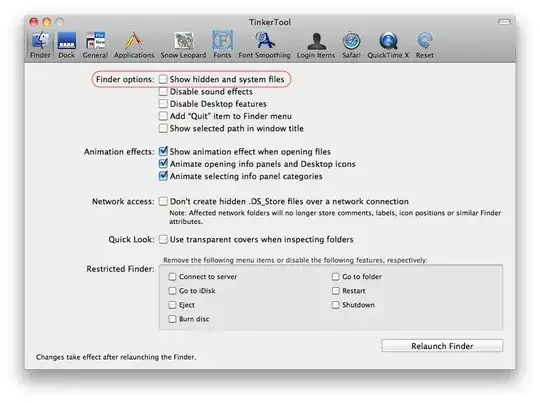


Am1rr3zA
- 13,219
- 14
- 68
- 88
-
1
-
2At the time of writing the download link for the Hidden Files widget is broken. – saw-lau Jul 24 '11 at 09:07
-
1
-
Links to hiddenFiles/Deeper/TinkerTool are broken and landing page has no information about them. – Varun Bhatia Apr 15 '13 at 05:40
-
-
1
4
You can customize Finder through Terminal commands such that it defaults to show/hide hidden files.
To show hidden files and restart Finder:
defaults write com.apple.finder AppleShowAllFiles YES; killall Finder /System/Library/CoreServices/Finder.app
To hide hidden files and restart Finder:
defaults write com.apple.finder AppleShowAllFiles NO; killall Finder /System/Library/CoreServices/Finder.app
s

Shawn Conn
- 141
defaults write -g AppleShowAllFiles -bool truewill show dotfiles in "open file dialogs" permanently. See link – wisbucky Feb 14 '22 at 06:49