The command line utility screencapture claims to be able to capture a single window without requiring interaction, but I can't figure out what to pass it.
-l<windowid> capture this windowsid
It's not the process id of the the application.
The command line utility screencapture claims to be able to capture a single window without requiring interaction, but I can't figure out what to pass it.
-l<windowid> capture this windowsid
It's not the process id of the the application.

For some applications you can use AppleScript:
screencapture -l$(osascript -e 'tell app "Safari" to id of window 1') test.png
It doesn't work with Chrome though.
The IDs are also shown in Quartz Debug (available from developer.apple.com/downloads) if you run defaults write com.apple.QuartzDebug QuartzDebugPrivateInterface -bool true.
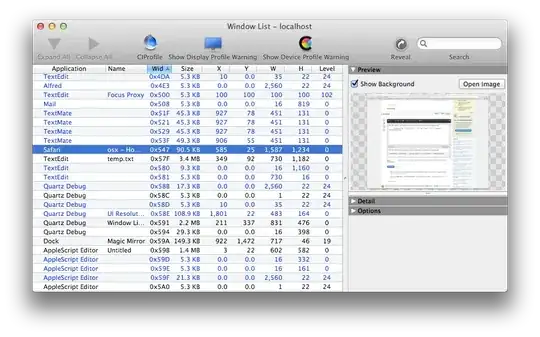
I wrote a little command line utility to retrieve the Window ID for apps that don't support AppleScript. Get it here: https://github.com/smokris/GetWindowID
You can then capture a specific window by specifying its bundle name and window title:
screencapture -l$(./GetWindowID "Vuo Editor" "untitled composition") VuoEditorWindow.png

(' ./GetWindowID.m: line 4:int main(int argc, char **argv)'
– KingBOB
Sep 06 '13 at 22:25
Makefile and GetWindowID.m, then run the command make. It will produce a binary called GetWindowID, which you can then invoke using the command I described in my answer.
– smokris
Sep 24 '13 at 04:37
I wrote a command line utility that wraps over screencapture and the Quartz windowing library.
Grab it here: https://github.com/alexdelorenzo/screenshot
Use it like this:
screenshot Chrome -t "Stack Overflow"

As far as I can tell, there still isn't an easy way to get the window ID from the command line. However today (in 2022) we have Shortcuts that allow you to easily take a screenshot of a single window 
shortcuts run "Find My to File" (if Find My to File is the name of the shortcut)
The window ID does not seem to be generally exposed to AppleScript. However, the window geometries are exposed. So instead of using screencapture -l you can use screencapture -R x,y,w,h to capture the specific portion of the display covered by the target window. With AppleScript, the process can be selected by Unix PID as property "unix id".
Assuming the process has just one window and your PID is in $PID:
screencapture -R \
`osascript -e 'tell application "System Events" to get { position, size } of first window of (first process whose unix id is '$PID')' | tr -d ' '` \
window.png
If the process has multiple windows, you need to select by the target window title:
screencapture -R \
`osascript -e 'tell application "System Events" to get { position, size } of (first window whose title is "My window titlebar text") of (first process whose unix id is '$PID')' | tr -d ' '` \
window.png
Tip: You can list the selectable properties of any object with get properties: osascript -e 'tell application "System Events" to get properties of first process whose unix id is '$PID


