I would like to find a combination of keys to clear the contents of the clipboard or better yet an application that can configure a timer to clear it automatically one minute after last paste operation.
Asked
Active
Viewed 1.3k times
14


-
See also https://apple.stackexchange.com/questions/245067/clear-clipboard-on-os-x-after-n-seconds – lhf Feb 05 '22 at 19:13
4 Answers
14
To set a combination of keys to clear the clipboard, you can create a Service using Automator.
Your service will have a single action, Run Shell Script
The shell script you will use is this:
pbcopy </dev/null
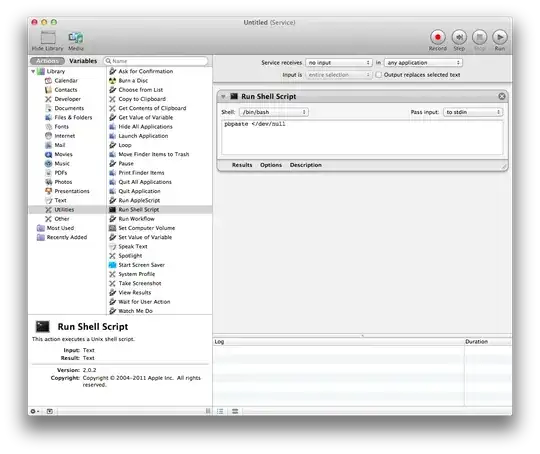
Then save the service and assign it a keystroke using System Preferences » Keyboard » Keyboard Shortcuts » Services.

The challenge of an application that automatically clears the clipboard one minute after the last paste operation is that said application would have to monitor all the copy and paste events across all applications; presumably you would want the action cancelled if you pasted and then copied new text (you wouldn't want to clear the new content from the clipboard one minute after the last paste of the previous clipboard contents). Such a program could be written, but implementing it with AppleScript or Automator would be a challenge.

Daniel
- 34,803
9
Yes, you have a choice of three built in methods for clearing the clipboard.
AppleScript/Automator are two simple methods for programmatically manipulating the clipboard.
Here's a little script that does what you want.
tell application "System Events"
    try
        set the clipboard to ""
    on error err_message
        display dialog err_message
    end try
end tell
Also, Automator allows the same. You'll need to define a variable, double click on the name text to set it to null, and then drag in the set clipboard action before running / saving it. The benefit of using automator is that you can assign it as a service and then use system keyboard shortcuts to call it.

For AppleScript or one of the nice terminal answers here that use pbpaste you might want to look at a free tool like FastScripts to launch the action from anywhere.

bmike
- 235,889
6
This terminal command replaces the clipboard with an empty string:
echo -n '' | pbcopy
You could put this in a script, then use cron or make a launchdaemon to automate the execution and timing.
Credit for the solution goes to: ShadowOfGed @ Applenova Fora

IconDaemon
- 19,234
3
https://langui.net/clear-clipboard/
Clear Clipboard allows you to clear the clipboard content manually or automatically, preventing your clipboard data from being peeped while you are absent.
You can chose to clear the clipboard content every few seconds and enable clearing clipboard on computer sleep / display sleep / screen lock to maximize protection of your sensitive clipboard data.

Motsel
- 959