I would like to wipe my entire hard drive and reinstall Lion from scratch. I try to use the Lion Recovery tool but it does not wipe the disk so I still have all my installed programs that I don't want. I do not want to delete them by hand just want to do a clean install of the OS.
Asked
Active
Viewed 1,219 times

3 Answers
6
I just did this yesterday, so it's still fresh in my mind. Make sure that when you restart your computer, you hold Cmd-R to enter recovery mode. Inside that, choose "Disk Utility" and there you can erase your Mac OSX partition.
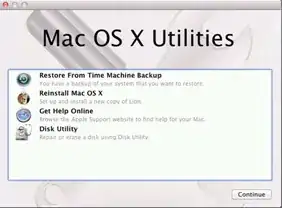
If you do not do that and simply select "Reinstall Mac OS X", then it will not erase your drive, but just overwrite the parts that need to be overwritten.
Note that you will not be able to erase the Lion recovery partition this way. All options to modify this partition are disabled in Disk Utility. There is really no need to wipe this, and erasing and formatting the main partition should be sufficient.


-
Once I erase the drive I can then do the Recovery to reinstall the OS? – Lukasz Apr 02 '12 at 18:31
-
Have you done this yourself? – gentmatt Apr 02 '12 at 18:32
-
@gentmatt See the first line of my answer :) – rm -rf Apr 02 '12 at 18:32
-
But you did not reformat it, right? – gentmatt Apr 02 '12 at 18:33
-
I'd be surprised if the recovery partition could wipe the entire disk. It might be able to wipe the Lion partition, and that might be enough for the OP. I'll have to play around with this. – Kyle Cronin Apr 02 '12 at 18:34
-
@gentmatt Yes, I did reformat it. In the linked question, I mention I did a 3-pass wipe and formatted it as Mac OSX Extended Journaled – rm -rf Apr 02 '12 at 18:35
-
@KyleCronin No, it cannot wipe the Recovery partition itself. That's about 1 GBish, and all options to do anything to that are disabled. To do that, you'd have to use a USB bootable lion. – rm -rf Apr 02 '12 at 18:36
-
I have not managed to reformat my SSD using this method. – gentmatt Apr 02 '12 at 18:36
-
@gentmatt Mine is a HDD, and an older mac at that — late 2008 (non-unibody) – rm -rf Apr 02 '12 at 18:37
-
I just formatted it, and its reinstalling the OS now. Looks like this is the correct procedure for what I was asking. I will update once it is done. Thanks! – Lukasz Apr 02 '12 at 18:37
-
@Lukasz Glad it worked :) – rm -rf Apr 02 '12 at 18:37
0
Download and run the Lion Recovery Disk Assistant. This will let you put a bootable Lion installer on a USB stick. Then reboot, holding option, and select the USB drive you just created. You will then be able to completely wipe and repartition your internal drive and reinstall Lion.

Kyle Cronin
- 23,242
- 21
- 83
- 143
0
What methods are available to (re)install Lion on a Mac?
Check out this other Q:A, which details many ways of installing Lion, including creating media so that you can perform a clean install from a DVD, without needing to use the restore partition.
