My Macintosh HD is running out of space so I want to take space from its Data partition. I have tried many times but I have no idea how to do it correctly. Any help appreciated.
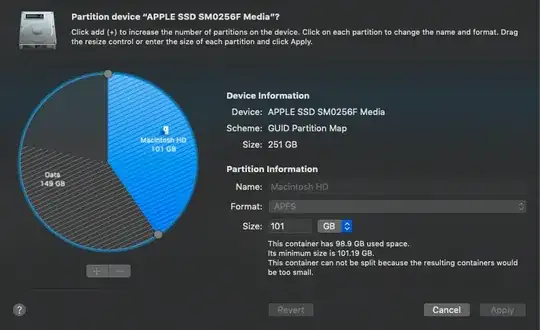
My Macintosh HD is running out of space so I want to take space from its Data partition. I have tried many times but I have no idea how to do it correctly. Any help appreciated.


To add space to the Macintosh HD partition, free space would have to occur between the Macintosh HD partition and the Data partition. You already shrink the Data partition to create free space, but this free space after the Data Partition and therefore cannot be added to the Macintosh HD partition.
One possible solution would be to backup the Data partition to an external drive, then recreate the Data partition with free space before the partition. Afterwards you could restore the Data partition from the backup.
Another solution would be to move the Data partition so the free space would be before the partition. This probably would require third party tools.
GNOME Partition Editor (GParted)
This may require use of a wired keyboard and/or mouse.
This is a free product. Instructions for creating and using a bootable GParted flash drive is given here. Also, note that Ubuntu Live bootable USB flash drives come the GParted already installed. So another option would be to download Ubuntu Live and use Etcher to create the flash drive.
Since you have already shrunk the partition containing the Data volume, I would recommend you use this product to move the partition containing the Data volume with further resizing.
Basically, use this product to move the partition containing the Data volume to the end of the drive. Next, use the diskutil command to add free space created between the partitions holding the Macintosh HD and Data volumes to the partition (and APFS container) holding the Macintosh HD partition.
Below is an example of the command to enter. To confirm this would be the correct command, I would first need to see the output from the command diskutil list.
diskutil apfs resizecontainer disk0s2 0
Paragon Hard Disk Manager for Mac
To use this would require a purchase. You install this product as an application. Basically, use this product to move the partition containing the Data volume to the end of the drive. Next, use the diskutil command to add free space created between the partitions holding the Macintosh HD and Data volumes to the partition (and APFS container) holding the Macintosh HD partition.
Below is an example of the command to enter. To confirm this would be the correct command, I would first need to see the output from the command diskutil list.
diskutil apfs resizecontainer disk0s2 0
Note: Apparently, you can also create Bootable Recovery Media. In your case, I do not think the using Bootable Recovery Media would be necessary.

My Macbook is Intel with Mojave OS version, the format of Data partition is 'Mac OS Extended (Journaled)'. Yes you are right, i shrinked the Data partition to get the free space but it can't be added up to Macintosh HD. The backup&restore solution is what i was thinking but it would take more time, so i think third party tool is needed to archive this.
– Hung Nguyen Mar 15 '23 at 04:18
diskutil list(in code block format, so it displays accurately). – Gordon Davisson Mar 14 '23 at 04:03diskutilinformation to advise further. – Tetsujin Mar 16 '23 at 10:27