Is there any way to disable Command+W in the terminal?
On several occasions I have accidentally closed a terminal window containing important information when I meant to close a Safari tab and did not realize that the terminal was the active window.
Is there any way to disable Command+W in the terminal?
On several occasions I have accidentally closed a terminal window containing important information when I meant to close a Safari tab and did not realize that the terminal was the active window.
To disable ⌘W in Terminal, do the following:
From the menu in the top left corner of the screen, select System Preferences. Click on Keyboard then Keyboard Shortcuts then Application Shortcuts.

Click the + button to add a new shortcut
Select "Terminal.app" for the application, and for the command, type Close (this is case sensitive). You must provide a keybinding, but it doesn't have to be the default. In the shortcut box, give it a different shortcut, like ⌘ControlW 
Now ⌘W will not close your terminal windows.


You can set a prompt before closing in the preferences:
Terminal Preferences → Settings → Shell


I tried all of the above, and none worked for me.
What worked was changing the shortcut for the "Close" command.
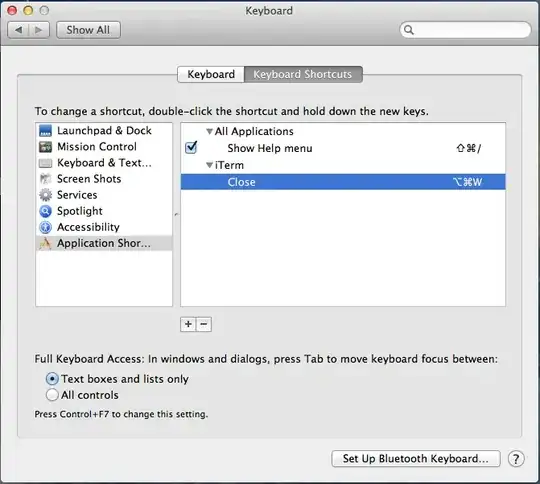

I propose this:
In iTerm: Open Preferences (⌘+,), click tab Keys, at the bottom of Key Bindings click +. In the appearing dialog, click Click to Set, then type ⌘+w and leave the default Action Ignore.

A bit of an old question but in iTerm2 this helped me:
iTerm2 → Preferences → keys → Add key mapping: "command + w" => ignore

Goto Keyboard System Preferences and select "Keyboard Shortcuts". Then choose Application Shortcuts from the left and click +. Choose "Terminal.app" and enter a menu item that is not that critical. I chose "Bring All to Front". Then click into Keyboard Shortcut and hit CMD+W. Click OK.
Using this technique have have successfully redirected the CMD+W shortcut in Terminal.

For iterm, as @Shwaydogg mention:
For those using iTerm go to Prefrerences -> Profiles -> Session -> Prompt before closing!

Also worth mentioning BetterTouchTool (http://www.bettertouchtool.net/)
I wanted to have both ⌘W & ⌘C both perform Copy (muscle memory, don't ask). The native method only allows you one key per command, with BTT I was able to have both keys mapped to same command, while also avoid the undesired Close WIndow behaviour


