This may not be the ideal solution. However, after following these steps, you will be able to search for brew formulaes by URL.
Paste the following AppleScript code into a new Script Editor.app document.
(I named my version "Brew_Master_List_Formulaes_Cataloger.scpt")
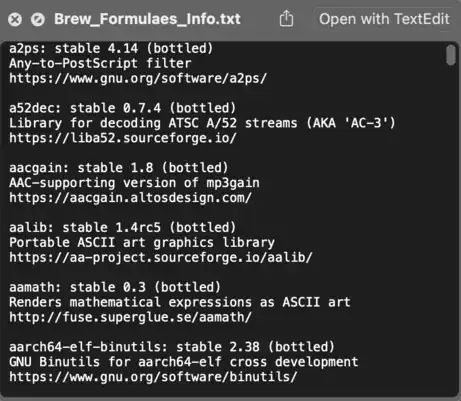
This AppleScript code will create 2 text files on your Desktop. ("Brew_Formulaes_List.txt" and "Brew_Formulaes_Info.txt")

property brewFormulae : POSIX path of (path to desktop) & "Brew_Formulaes_List.txt"
property brewFormulaesInfo : POSIX path of (path to desktop) & "Brew_Formulaes_Info.txt"
do shell script "/usr/local/bin/brew formulae > " & quoted form of brewFormulae
try
    do shell script "rm -f " & quoted form of brewFormulaesInfo
end try
set brewItemInfo to reverse of rest of reverse of paragraphs of (read brewFormulae)
repeat with i in brewItemInfo
    do shell script "/usr/local/bin/brew info " & quoted form of i & ¬
        " |sed '1,3!d' >> " & quoted form of brewFormulaesInfo
    do shell script "echo ' '" & " >> " & quoted form of brewFormulaesInfo
end repeat
NOTE: The "Brew_Formulaes_Info.txt" file could take up to 3 hours to be completed.
Once your "Brew_Formulaes_Info.txt" has been created, you can now search by URL, using the "Brew_Formulaes_Info.txt" as the source.
In Terminal.app, change your pwd (present working directory) to your Desktop with this command cd ~/Desktop (because this is where your "Brew_Formulaes_Info.txt" is located)
Now, for instance, the URL you want to search for contains "advancemame.it/scan-readme.html" (you will get better results by omitting the http:// or https:// or www.), your search commands in Terminal would be...
grep -ERIhi -B2 'advancemame.it/scan-readme.html' Brew_Formulaes_Info.txt
The result should look something like this...

Using your example URL...
grep -ERIhi -B2 'https://sqlitebrowser.org/' Brew_Formulaes_Info.txt
produced no results but...
grep -ERIhi -B2 'sqlite.org' Brew_Formulaes_Info.txt returned


