Due to the lack of Bluetooth 5.0 on my 2014 MacBook Pro, I've purchased an Asus BT500 as I've seen reports of people using it successfully with macOS. The dongle is listed as USB device, but I can't activate it such that my Bluetooth devices would connect to the dongle rather than to the internal Bluetooth controller.
Is there any advice on how to force macOS to use the dongle or how to debug the process? I still can return this Asus dongle, so if you do know of an alternate manufacturer's dongle which does work for you, I would also welcome your suggestions!
Environment
macOS Big Sur 11.2.3 (but I've also tried latest Catalina)
MacBook Pro Retina, 15", mid 2014
The dongle is recognised as usb device:

Things I've tried
I've tried to deactivate bluetooth, connect the dongle, reactivate bluetooth (source)
I've tried
sudo nvram bluetoothHostControllerSwitchBehavior=always(source)I've tried switching the controller with apple's "Bluetooth Explorer" (source). The dongle is listed there. But if I activate it, bluetooth devices are disconnected, then reconnected again; then the internal controller is displayed as
[ACTIVE]again in the Bluetooth Explorer, not the bluetooth dongle.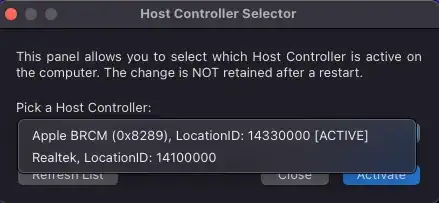
I've tried
sudo kextunload -b com.apple.iokit.BroadcomBluetoothHostControllerUSBTransportto unload the kernel module for the internal controller, but I get:Error Domain=KMErrorDomain Code=71 "Kernel request failed: (iokit/common) unsupported function (-536870201)" UserInfo={NSLocalizedDescription=Kernel request failed: (iokit/common) unsupported function (-536870201)}I've disabled System Integrity Protection (source) and tried to switch the controller then, but this does not make a difference.

