I have been trying unsuccessfully for the past few days to install Windows 10 on my mid-2012 15" MacBook Pro. I've read a few different sites (including this one), but I am just struggling to parse the information into something that has proven useful to me.
I downloaded the latest ISO from the Windows 10 site (October 2020 update). I went through the Bootcamp Assistant prompts - mounting the ISO to a 32GB flash drive, downloading the Bootcamp drivers, and creating the partition (200GB).
The MBP critical information is as follows:
- Mojave 10.14.6
- 1TB SSD
- DVD Drive recently not operating correctly (still need to troubleshoot)
- No USB devices plugged in besides flash drive with mounted ISO
When I reboot after Bootcamp Assistant is complete, I hold down ALT and am shown three options: my OS X partition, my USB drive, and EFI Boot. I select EFI Boot.
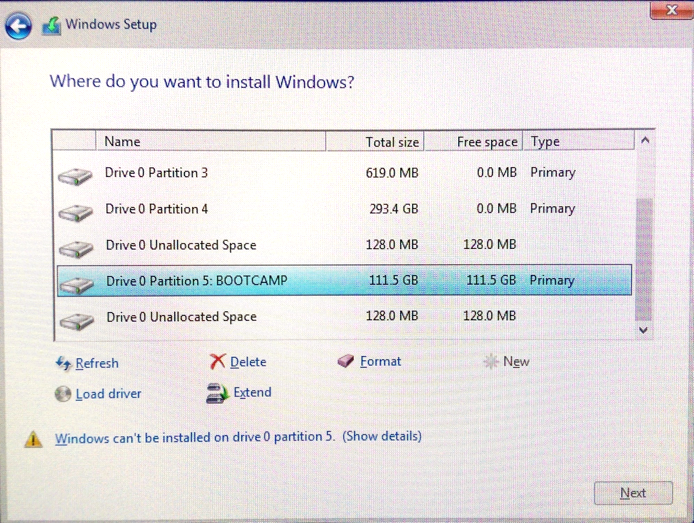
I then go through the motions, entering my product key etc, after which I am confronted with a screen with the partition selections. Of course, I cannot choose the option OS X has created for Bootcamp because of it being recognized as MBR instead of GPT. I used GPT fdisk (had some trouble with rootless system but was able to get past that by disabling in recovery environment) and received the following message:
Warning: Devices opened with shared lock will not have their
partition table automatically reloaded!
Partition table scan:
  MBR: protective
  BSD: not present
  APM: not present
  GPT: present
Found valid GPT with protective MBR; using GPT.
This indicates there is nothing wrong and it is indeed a pure GPT partition table, no? Either way, I thought so, so I went back into OS X and deleted the Bootcamp partition in Disk Utility and manually re-created another partition to use. I got my inspiration from this article and was able to get back to Windows Setup within EFI Boot, delete the partition within that environment which I had created manually earlier, and then create a new partition with the newly unallocated space.
After this, it begins the process of installing Windows. Unfortunately, the joy does not last long because I end up with a BSOD, followed by multiple reboots where I have the option to try to "recover." This results in more BSOD's and a loop of involuntary reboots until I hold down ALT and tell the computer to go back to OS X (with my head hanging in shame).
I'm at a loss as to what to do next here. Right now I am downloading an older version of Windows 10 in the background to see if perhaps it's an issue related to that. This guy seems to believe an older version of Windows is necessary in order to have success. We'll see.
As others have noted, it's not possible to boot from the USB directly as the laptop simply comes up with a black screen indicating there's "no bootable device, press any key, etc." This would certainly be the preferred method if it were possible. Any help is appreciated!
EDIT: Here is a post outlining the exact place I am at. The thread indicates USB3.0 drivers are the issue now. I'm prepared to start over and track down the necessary drivers to add to the appropriate folder in my flash drive, but I'm now starting to wonder if there's any other steps I need to be aware of before I run into potentially the next road block.