How can i remove the "Eject" icon from the menubar?
It's an icon that starts on login. It ejects all mounted disks (dmg/usb/etc...).
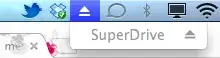
How can i remove the "Eject" icon from the menubar?
It's an icon that starts on login. It ejects all mounted disks (dmg/usb/etc...).
flag it for moderator attention to have it closed, and don't answer it. There's no point in duplicating information all over the place.
– slhck
Feb 14 '12 at 11:53
If you have Bartender installed, use Shift+⌘ and drag the icon away from the menubar.


