0

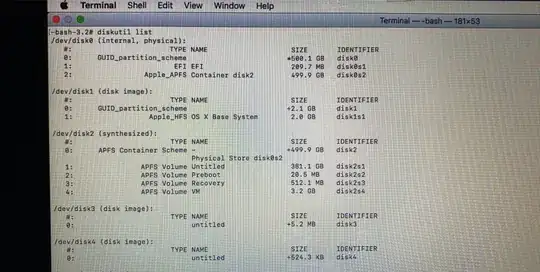
Please help me, this is my last year at university, and all my files and projects are on my device. I had two sections 399 gigs for the Mac system and 100 gaps on which I installed Linux .. After a while I deleted the Linux and upon restart I couldn't log in and some solutions worked out but the problem still exists. enter image description here enter image description here

Update:

enter image description here

Thanks, the answer worked, but I have this problem: When I start my compute, it goes to EFI boot, I think it's for windows 10. I don't need it. I want to delete it and put my priority macOS. How i can do that? I'm soooo scare to do any things.

And, I can't see the 100 GB partition. enter image description here
0xFun
  • 1
  • It would be really helpful to document what you did to delete Linux and what those some solutions that worked out were. – David Anderson Jun 12 '20 at 15:25
  • Please .. – 0xFun Jun 13 '20 at 13:52
  • I'm destroy the gpt and created agian But it's still not work .. my internal partition it's unmount i can't mounted – 0xFun Jun 13 '20 at 13:58
  • Can you post the output from the following command? export LC_CTYPE="ASCII"; dd if=/dev/disk0s2 count=1 | vis -c – David Anderson Jun 13 '20 at 15:40
  • Well I added the picture that you asked for in my question, you can see it .. – 0xFun Jun 13 '20 at 15:55
  • Can you help me – 0xFun Jun 13 '20 at 19:00
  • Now that things seem to be accessible, there's an important thing to do before going much further: MAKE BACKUPS OF EVERYTHING IMPORTANT! If something important is only on that computer, it can be lost to any of a variety of problems. I'd recommend multiple backup copies (kept in different places) of anything really important. If you know where all the important things are, manually copying them to something like flash drives might be sufficient. But a proper backup program (or two, one for macOS & one for Windows) would be even better. Or both! – Gordon Davisson Jun 13 '20 at 21:34
  • 1
    We get a question similar to your question quite often here at Ask Different. Therefore, I will asked that this question be marked as a duplicate of this question: OS volume shows as type 'FFFFFFFF-FFFF-FFFF-FFFF-FFFFFFFFFFFF'. If you need further help, please ask a new question. – David Anderson Jun 14 '20 at 00:04

1 Answers1

0

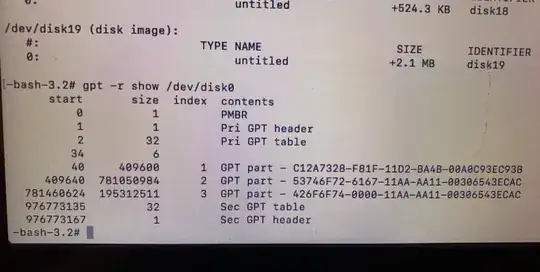
You made partition 2 type 53746F72-6167-11AA-AA11-00306543ECAC. You should have made partition 2 type 7C3457EF-0000-11AA-AA11-00306543ECAC.

The commands to change the type are given below. I assume you are entering the commands from macOS Recovery or from a installation flash drive.

gpt remove -i 2 /dev/disk0
gpt add -i 2 -b 409640 -s 781050984 -t 7C3457EF-0000-11AA-AA11-00306543ECAC /dev/disk0

Update:

Do the following to make macOS the default.

Hold down the control key when you choose Untitled.

I am not sure what you did to merge the 100 GB partition back to the APFS container. This was in explained in my answer. However, the results you posted in your update look good.