2

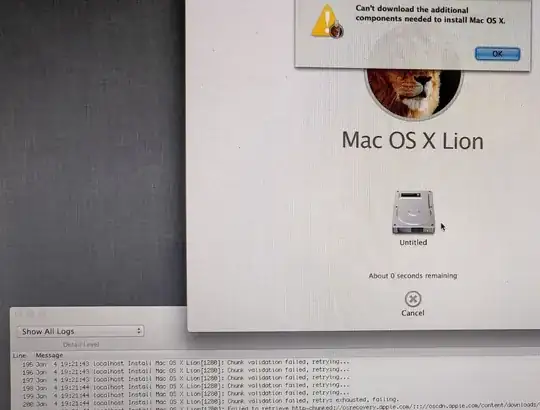
First of all, I am new to Mac OS. I have a MacBook pro 2011, and I am trying to install X Lion using the recovery mode (network install) and I keep on getting the "can't download the additional components needed to install Mac OS x" and when I checked the log it appears that the installer is failing to download some chunk thingy and it gives this error message "Chunk validation failed, retrying...".

What happened to my Mac is that I tried to upgrade to a higher version and for some reason the installation got stuck at some point so I had to restart the MacBook manually, after that it stuck into an installation loop, so I erased the hard disk including all the recovery partitions.

Now as I mentioned I am unable to finish the installation using the network, I have tried several different networks to be sure that I don't have any blockage, I also tried installation using a USB but it seems to never show as a boot option, no matter what.

So, my question is am I missing something? And what's that error? And most importantly, how to get rid of it and install the OS.enter image description here
Mimo_dz
  • 21
  • Try saving the log and then re-running the installer. – Allan Jan 04 '20 at 18:50
  • 2
    Have a look at https://apple.stackexchange.com/questions/309399/how-can-i-download-an-older-version-of-os-x-macos - I'm wondering if it could be the date issue, but tbh the whole thing is now getting so confused i can no longer keep track. – Tetsujin Jan 04 '20 at 18:58
  • @Allan, I have tried that and it doesn't work at all, I have actually tried it like 100 times. – Mimo_dz Jan 04 '20 at 21:13
  • That's good to know! If you've tried something be sure to include it in the question as it helps us by not going down an avenue you've already tried. The 2011 MBP has an optical drive..have you tried that installation method? Also, how did you erase your drives? – Allan Jan 04 '20 at 21:20
  • I didn't include that because it doesn't seems to be a valid solution at all. I didn't try the optical drive because I don't have a DVD on me nor able to burn one. I erased the drive from the utility thingy before starting the network installation. – Mimo_dz Jan 04 '20 at 21:30

1 Answers1

0

Ran into the same issue, honestly I feel as if the location is the wrong path to install since it's so old. My startup options functions aren't working or I'd just do a USB install. To anyone who still finds this hold option command + p + r and load a bootable .deb file to a USB and run from startup.