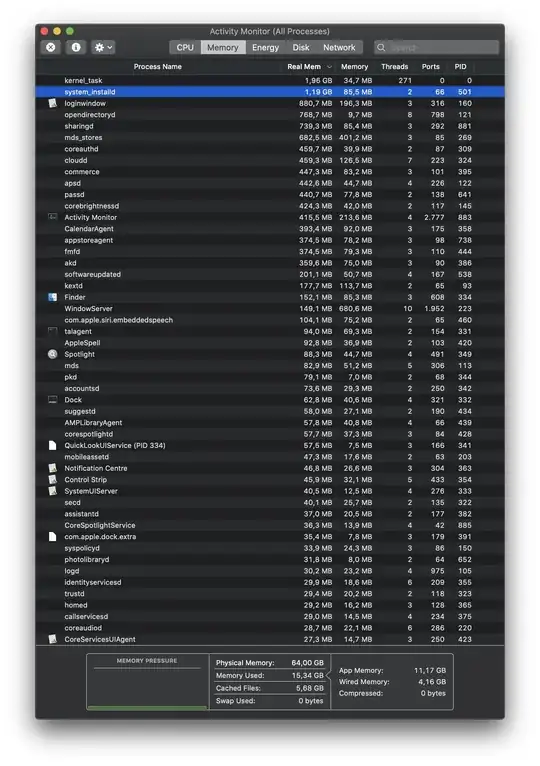
No - there’s not a sysctl to change this on macOS that I’m aware of. The first accommodation for server workloads is to enable more processes, but that won’t affect vm allocation or recompiling the frameworks.
If for some reason you are running more server workload and want to sacrifice a little single threaded performance to let lots of daemons run well - try enaBling performance mode for server and get Apple’s tuning for that workload.
I see this as efficient use of the RAM as there’s a long history of caching aggressively and loading frameworks off disk when referenced, then balancing later on macos:
To convince yourself this is as designed, you could make a new user account, disable auto log in for any migrated accounts and get a clean restart. Per my comments, nothing looks to be drastically out of the design intent of macOS. If you wanted to dig deeper into your exact memory allocation:
- Grab a
sysdiagnose from the brand new account
- Grab a
sysdiagnose from your account now and in a couple days once all the third party apps you have installed are updated / stable.
- Push the kernel and virtual memory subsystem a bit with actual apps running - the system is going to throw RAM at anything since you have so much. I see this more froM the viewpoint that it’s wasteful to power 64 GB of RAM and not allocate it.
The system doesn’t need free RAM for anything except a new allocation.
There’s zero chance your Mac can’t allocate a ridiculous amount of RAM instantly in the above snapshot with >32 GB still free.
There a long history of expectations about memory management from perspectives of other OS / other kernels / and legitimate learning curves on macOS so I don’t doubt you’re worried a little, but we may need to get into an actual problem.