6

Why is screencapture command only takes the screenshot of the desktop image and not the windows on top in Catalina? I keep on trying on Catalina compared to High Sierra or Mojave where this is not the case with screencapture command.

Here is the link to the shell script on my Github: https://github.com/shyamalschandra/screenshot2speech The relevant command is

screencapture -s ~/Downloads/screen.png

http://osxdaily.com/2011/08/11/take-screen-shots-terminal-mac-os-x/

anki
  • 11,753
  • you might find man screencapture helpful. flags like -w and -W and -o are helpful. – anki Nov 02 '19 at 13:17
  • @ankii I know the man screencapture. Nothing has changed AFAIK between Mojave and Catalina. – Shyamal Chandra Nov 02 '19 at 13:21
  • What was the exact command you used ? And which app was in focus ? – anki Nov 02 '19 at 13:21
  • @ankii : Here is the link to the shell script on my Github: https://github.com/shyamalschandra/screenshot2speech – Shyamal Chandra Nov 02 '19 at 13:24
  • I have the same issue when Finder or Preview is the foreground app. The answer from Nic below sheds some light but not fully. My personal workaround is to let some other app on the top, put Finder or Preview in between the top app and the desktop, and then select the area of Finder or Preview. – pigtail Mar 19 '21 at 23:15

3 Answers3

5

I got same issue and finally found out what was wrong. Go to System Preference>Security & Privacy>Screen Recording, And give them permission to capture.

enter image description here

  • I was having this problem suddenly where screen capture (CMD+Shift+4) was recording the background. When I went to the Screen Recording Privacy Menu there was no Terminal. Once I added it, the problem was fixed. Reeeally annoying. – mattador Oct 25 '22 at 21:30
4

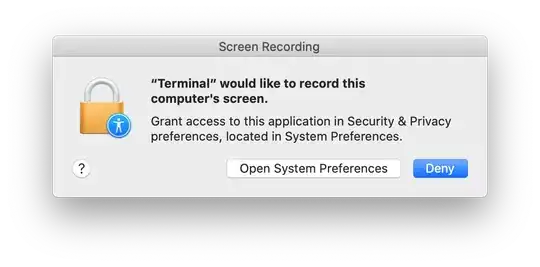
Starting with macOS Catalina, applications must be granted the ScreenCapture permission before they can capture any content from the screen. How do I configure Screen Recording permission on macOS Catalina? Normally when you run a command like screencapture you should be presented with an authorization prompt like this one:

If you don't see this prompt, you might need to reset your screen recording permissions for the Terminal application you are using: How do I reset Screen Recording permission on macOS Catalina?

tccutil reset ScreenCapture com.apple.Terminal
Nic
  • 3,722
  • I have the same issue and noticed this permission restrain. After a full reset of screen recording permission, I still only get desktop image if the Finder or Preview is the foreground app. The screen recording pop-up message doesn't show either if Finder or Preview is the foreground. – pigtail Mar 19 '21 at 23:06
1

Instead of screencapture -s ~/Downloads/screen.png source where -s is for

Only allow mouse selection mode.

try -w. It will show a camera icon and wait for you to select a window. Hit esc to cancel the process.

screencapture -w ~/Downloads/screen.png

-w Only allow window selection mode.

I cannot say why -s doesn't work, but on Mojave, the man page says

The screencapture utility is not very well documented to date. A list of options follows.

anki
  • 11,753
  • However, now when I saw other posts of scripting. you might need to get the window id, instead of manual response every time. – anki Nov 02 '19 at 13:36
  • I need the manual two screen coordinates because then, I can extract the textual content for speech synthesis. – Shyamal Chandra Nov 02 '19 at 21:15
  • I don't understand as I never used the command. What do you suggest I look for ? – anki Nov 02 '19 at 21:28