0

I'm totally blind, and have a MacBook with MagSafe 2 connected to the extension cable. Would somebody be able to explain how the cable can be wound around the clip on the MagSafe 2 and the pop-out wings on the power brick end to make it easier to transport in a bag? Lots of references that I've found on how this can be done are either videos or images which makes it harder to understand how this is done.

Thanks.

elliott94
  • 1,193

3 Answers3

4

I realize your post states you're completely blind, but I had to add pictures to make it absolutely clear to a sighted helper what I'm attempting to describe to you. My answer may also help others have a healthier relationship with their MagSafe charger cables.

The MagSafe cable, where it connects to the power brick, tends to get too severely bent with 'normal usage', even though there is additional strain- and bend-relief built into the cable, and the cable integrity can be compromised. When winding the MagSafe cable for transport, I tend to position the bend-relief section of the cable so it sticks straight out from the power brick, then proceed to wind the MagSafe cable firmly around the wings. When wound correctly, and the last 2 inches of the cable is free, I loop the the MagSafe cable around the winding, and the connector neatly sits protected, inside the windings, at the top of the power brick between a wing and the bend-relief:
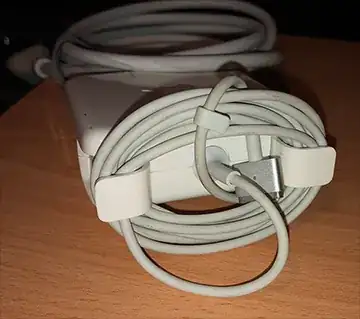
enter image description here

The power cable is wound neatly and fastened using a single Velcro-brand "One Wrap Thin Tie". The power cable has a natural tendency to coil in a particular radius which is optimal for keeping the wrap neat. Follow that coil, place the tie-wrap in the right spot, and all is neat.
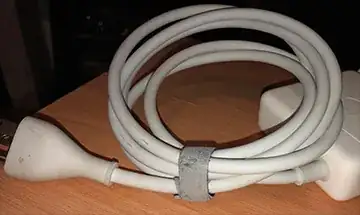
enter image description here

I've been throwing this power supply in and out of my bag weekly for the past few years. I'm a little OCD, and I treat my equipment with care, so YMMV.

IconDaemon
  • 19,234
2

I'll try to describe it as best as I can.

The thin MagSafe cable wraps around the fold out wings. On that cable you will feel a small plastic clip that slides along the cable. You want to slide this along the cable towards the MagSafe end of the cable, away from the power brick.

You will then hold the power brick in one hand and the thin cable in the other. Start wrapping it around the wings from there, sliding your hand along the cable as you go, keeping it fairly tight around the wings. When you get to the end, use the small plastic clip to fasten the cable to itself, securing it around the wings.

Next is the extension cable, this won't wrap around the wings. So this is down to personal preference. I usually coil it in loops then twist the last foot or so within itself. But being blind this may be more difficult than necessary. Another option is to wrap the cable around the power brick, crossways over the already secured thin cable, and hold it in place with a rubber band or hair tie etc.

In the end, wrapping serves only two purposes:

  • avoid entanglements with other items in the bag - you can mitigate that by putting your charger and cables inside their own small light bag and not worry.
  • avoiding a bend being always in the same place or a bend being tighter than the bend radius for the cables. As long as you don't crimp and pinch the cables, any smooth coil works well for longevity.
bmike
  • 235,889
Lowey
  • 36
-1

Something like this is best, no need for extra accessories, although it can be much tidier than in this picture.

enter image description here

Edit: Fair play I didn't read the question fully and missed the part about the OP being totally blind, apologies, an image isn't much use.

I still think this solution might be better potentially than some of the other solutions so I'll have a go at describing it.

The aim is to wrap the thicker cable around the square power block in one direction and then the thinner wire around the square block at a ninety degree angle using the pop-out wings. This allows the thinner wire to keep the thicker wire in place.

  1. Flip open the pop-out wings on the square charger block.
  2. Of the two attached wires, find the thinner wire with the Magsafe connector.
  3. Find the small plastic clip which slides up and down this thinner wire and push it to about 3cm or 1 inch from the Magsafe connector. We will use this later for clipping the wire.
  4. From now on you should hold the square power block oriented with the pop-out wings on the side furthest away from you. The thinner wire can just hang down, just make sure it's not tangled with the thicker wire.
  5. Now take the thicker wire and wrap it around the square block, starting from the side nearest to you and over the opposite side. The opposite side should have the pop-out wings and you are trying to wrap the wire evenly in between them. Don't worry if it isn't even though.
  6. Once you have wrapped up the thick cable, you'll have to hold it in place with your hand (I find it best to use my weaker hand here). Try to keep your hand away from the top side where the pop-out wings are.
  7. Now find the thinner wire and wrap it around the two pop-out wings. You should feel that you are surrounding the thicker wire as you do this and this is why I like this method. It keeps the thicker wire in place.
  8. Once you have wrapped up all of the thinner wire, you should be able to attach the end to one of the loops you just made using the small clip we slid towards the Magsafe connector earlier
chrismacp
  • 107