4

I know this is not natively supported in macOS, but I think it could be easily solved by an app that does the following:

  • Set the sound volume on the external monitor to a desired maximum level.

  • The app is a global volume slider for all the sounds generated by the MacBook.

  • You can use the app to easily control the sound volume of the external monitor.

Is there an app that does exactly this?

EDIT:

I tried SoundFlower but it was buggy and caused problems with other sound extensions. I discovered Sound Control which exactly does what I want. Even the built in macOS sound control works.

MJQZ1347
  • 149
  • 1
  • 1
  • 4

1 Answers1

5

A popular 3rd party software that lets you control the volume of a connected external display is Soundflower. It is a kernel extension.

The installer for the latest signed version with support for macOS Mojave can be downloaded here. If you use Homebrew, you can also install install it by running the command:

brew cask install soundflower

Since it is a kernel extension, you'll need to enable it by going to System Preferences app → Security & Privacy → General and click on Allow.
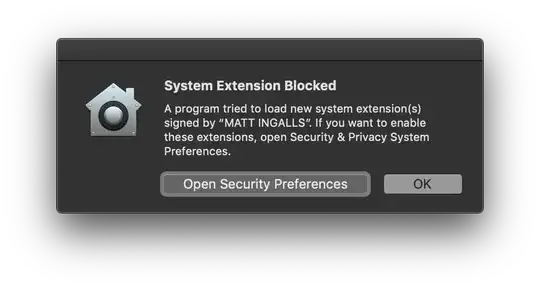
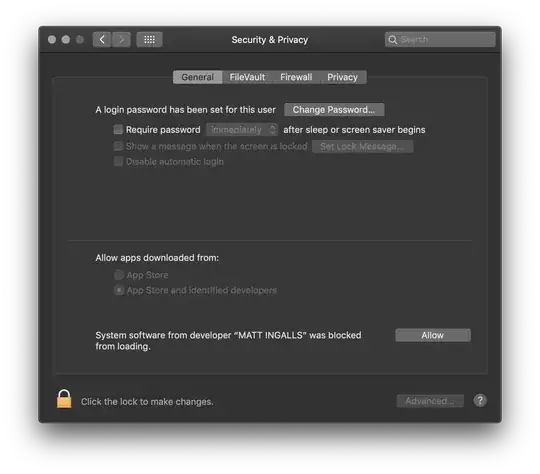
Next, you'll need to download and install the SoundflowerBed utility. It is the user facing macOS app that will let you control the audio. To install using Homebrew, run the following command:

brew cask install soundflowerbed

You are all set up now. Simply launch the SoundflowerBed app from Launchpad. It is a Menu bar app. Click on the app icon in the Menu bar and select DisplayPort, Thunderbolt or HDMI as the output in the (2ch) list.
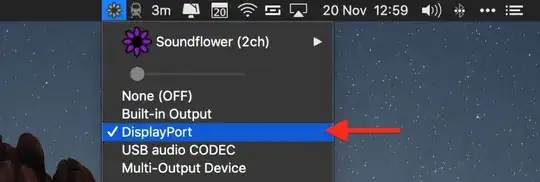
Now, click the volume icon in the Menu bar and choose Soundflower(2ch). You can also make this selection in the Sound System Preference pane.
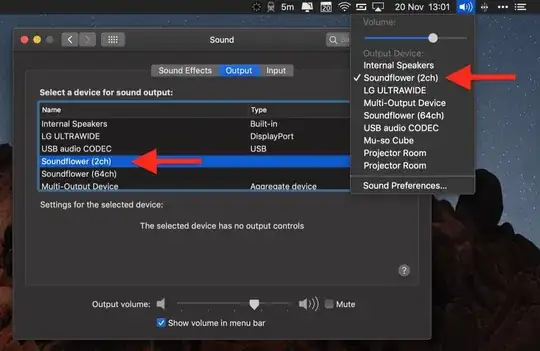
Now, you should be easily able to control the volume of your external display from your MacBook.

Note: Parts of this answer have been taken from the recently published article on MacRumors.

Nimesh Neema
  • 51,809
  • 1
    Great! Thank you, exactly what I was looking for. Does it support custom keyboard shortcuts and a hud display like the original mac sound control? – MJQZ1347 Nov 27 '18 at 08:09
  • Well I just went through the Mac Rumours thread. It seems like it wasn't updated since 2014. Some users don't suggest installing it because it messed up their audio. – MJQZ1347 Nov 27 '18 at 08:16
  • @MJQZ1347 The SoundflowerBed utility is not updated for a while, but the kernel extension has been updated to work with macOS Mojave. – Nimesh Neema Nov 27 '18 at 08:17
  • I was not able to install it. The installation failed even though I did everything like described (incl. ctrl + left clicking for opening the .pkg). Using homebrew did not work, either. – MJQZ1347 Nov 28 '18 at 05:50
  • This instruction helped: https://github.com/RogueAmoeba/Soundflower-Original/issues/79#issuecomment-422907975 Step 2 and 3 are crucial. – MJQZ1347 Nov 28 '18 at 05:56
  • BTW: Is there a way to get rid off SoundFlowerBed? I only need it once for selecting the output device. But closing it will make you lose the configuration. Any terminal commands for this? – MJQZ1347 Nov 28 '18 at 06:15
  • @MJQZ1347 If you wish to completely remove soundflowerbed from system, you can do so by running brew cask zap soundflowerbed. – Nimesh Neema Nov 28 '18 at 07:31
  • What I meant was: What do I need SoundFlowerBed for? Seemingly only for selecting the output device which I don't change that often. But closing SoundFlowerBed also resets the output device. So SoundFlowerBed needs to be running in the background. Is there a way to set the output device via terminal? – MJQZ1347 Nov 28 '18 at 16:38
  • @MJQZ1347 Sorry I have no idea (I am travelling currently and do not have access to an external display too). – Nimesh Neema Nov 28 '18 at 16:40
  • I have successfully installed for Catalina with this updated repo : https://github.com/anastasiuspernat/SoundflowerBed – Samusz Sep 04 '20 at 07:26