35

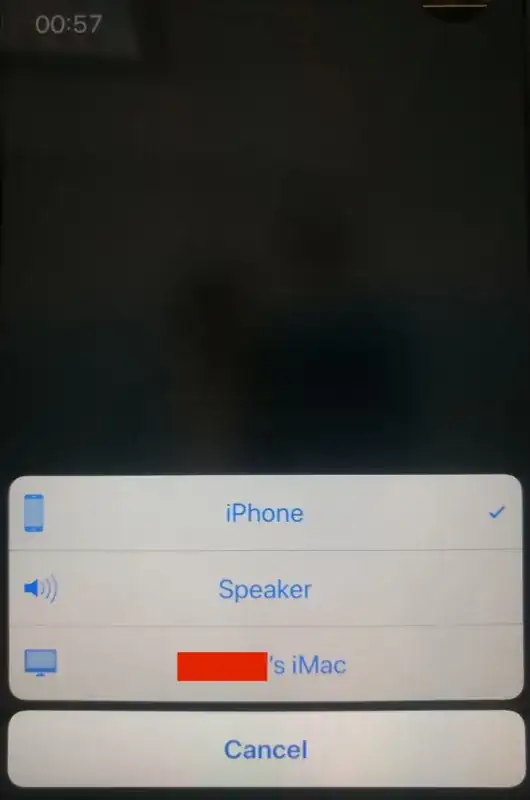
I just purchased an iPhone 8 Plus which is running iOS 11.2.1. I am upgrading from an iPhone 6s which I never upgraded to iOS 11. When I make a phone call, the top right option used to be a toggle for just speakerphone. Now, it shows "audio" and there are multiple options. They are: my iPhone, Speakerphone, and my iMac. My iMac did NOT used to appear as an option, and I do not want it to appear.

I want to be able to toggle speakerphone with a single tap, like I used to do. How can I resume that behavior?

What I have tried

  1. Disable Handoff on the iPhone 8 Plus

    • Disable handoff under Settings > General > Handoff
    • Reboot the phone.
  2. Disable Handoff on my iMac

    • Uncheck the option under Apple logo > System Preferences > General > "Allow Handoff between this Mac and your iCloud devices"
    • Reboot the computer
  3. Turn off wifi on my phone

    • I was curious to see if the iMac would not show up as an option when wifi was disabled, because I don't know how it was being discovered by my phone. Even with wifi disabled, the option still appeared. It must be because both the iMac and iPhone are signed into my iCloud account.

None of the above options had any impact.

Here are screenshots of my experience

in-call screen audio options list

boltup_im_coding
  • 583
  • 2
  • 5
  • 9
  • 2
    Has there been any update to this? I've tried everything on this forum and others (turning on/off wifi, turning on/off bluetooth, logging out of icloud which isn't reasonable) and nothing is working. The issue will be fixed for a few minutes and then the next phone call I get, it's back. This is so frustrating. I just want to hit the speakerphone button and get speakerphone! – Austin81 Jul 17 '19 at 21:26
  • Likely a wifi rather than bluetooth thing - if it's auto-discovering the iMac, and you don't need any device using that iMac for audio calls, then open into the iMac's FaceTime app, open preferences, and until 'calls from iPhone' or similar. N.b, this is a comment, not answer, as don't have the reputation on this site (yet) to answer. – Chalky Apr 22 '20 at 22:21
  • None of this worked until I rebooted my phone, then the other devices disappeared. Hope this helps – Josh Newman Jul 22 '21 at 15:30

7 Answers7

33

On your iPhone, go to Settings > Phone > Calls on Other Devices > un-check the Mac. Then switch off the "Allow Calls on Other Devices" toggle switch and restart the phone.

Also worth mentioning: simply switching off the "Allow Calls on Other Devices" toggle switch does NOT solve the problem - the Macs remain in the audio options list even if that option is off. You need to leave the option on and un-check each device before toggling the option off. You may not see the audio choices change until the phone is restarted.

Employee
  • 633
  • 2
    I've done this, and it works for a day, but the Audio->Mac always returns in place of speakerphone. The "calls on other devices" settings remain as I left them (completely disabled). So I repeat another day. – 2540625 Feb 21 '19 at 23:26
  • 1
    Just to confirm: are you making sure to leave the devices unchecked, but the Allow Calls on Other Devices setting checked? And have you restarted the phone? – Employee Feb 22 '19 at 16:33
  • 2
    You suggest I untick all devices under "allow calls", but leave "allow calls" itself ticked (rather than unticking it after confirming all devices are unticked)? I've now done that, rebooted, it was fixed immediately, but it returned later that day. – 2540625 Feb 25 '19 at 22:39
  • 1
    I tested it just now and it seems to work for me with "allow calls" both ticked and unticked. I remember that back when I posted this answer I was on iOS 11 and only having it ticked worked, but maybe it behaves differently on iOS 12 for some users. Might be worth posting this issue on the Apple Support forums to see if anyone else there is having the same issue on iOS 12. – Employee Feb 26 '19 at 11:18
  • sometimes uncheck does not effect. Just restart afterwards. – stratovarius Oct 14 '22 at 18:31
  • This never works for me. – 2540625 Mar 17 '24 at 21:26
5

i had the same problem and i solve it... in mac go to facetime and go to preference and just unclick the phone calls allow in this device...problem solved

3

Try turning off Bluetooth on both devices. If it disappears with Bluetooth turned off then you may need to forget that Bluetooth connection on your iPhone with the Mac.

  • 3
    I cannot turn off Bluetooth on either one. The phone needs it to connect to the car, and the computer uses both Bluetooth mouse and keyboard. The phone is not paired to the iMac via Bluetooth. – boltup_im_coding Dec 31 '17 at 02:23
  • 1
    It doesnt have to be paired if the Mac and iPhone are set up with the same Apple ID. Its an automatic process. If you aren't using the computer turn off the computer. – Melvin Jefferson Dec 31 '17 at 02:32
  • 1
    You can always temporarily turn Bluetooth on and off whenever you need it. – Melvin Jefferson Dec 31 '17 at 02:33
  • 1
    I have this problem, and I rarely use Bluetooth and never leave Bluetooth enabled. – 2540625 Feb 21 '19 at 23:27
  • I always keep my Mac Bluetooth disabled, it does not prevent this problem. – 2540625 Mar 17 '24 at 21:28
2

I solved this issue by disabling mdns broadcasting on all my macs.

In Terminal run this command (use sudo if you have SIP enabled).

defaults write /Library/Preferences/com.apple.mDNSResponder.plist NoMulticastAdvertisements -bool YES

I still haven't figured out how to remove AppleTVs from the list though.

dmg15
  • 126
  • Is sudo always required ? [Edit] if necessary – anki Nov 06 '19 at 22:40
  • 1
    This is the only answer that worked successfully for me. – Luc Oct 31 '22 at 15:50
  • What is “mdns broadcasting”, and what side effects might occur from disabling (why is it not disabled by default)? – 2540625 Mar 17 '24 at 21:29
  • It’s a service that enables the discovery of local network devices using a hostname instead of an IP address. If you try to connect to a device on your local network with its hostname and there is no local nameserver, your device will send a query to 224.0.0.251 on udp port 5353 asking any device with that hostname to respond with its IP address, if the device has MDNS then it is listening to 5353 and will respond. All devices with MDNS can see those broadcast packets and become aware of that host on the network. It’s the protocol that facilitates Apples Bonjour networking. – dmg15 Mar 19 '24 at 00:51
  • Turning it off means that if you want to connect to that mac from another device on your network, it may not be automatically discovered depending on the protocol you’re trying to connect via. If that’s the case, you simply have to enter the IP address of that mac to connect to it. You will notice this if you have a network shared drive in that mac, or you connect to it via ssh or screensharing or if you have a music library that you access via the ‘computers’ app on apple tv. – dmg15 Mar 19 '24 at 01:03
0

I had the same problem and found the solution!

Settings Click on green button "Phone" Click on "Calls on Other Devices" Turn off "Allow Calls on"

  • 3
    This is the same solution as Mike's, posted three months prior. – 2540625 Feb 21 '19 at 23:27
  • Overall it'd be great to at least add to the answer so it's useful, instead of a duplicate short answer which brings nothing to the table. – esaruoho Mar 29 '23 at 08:23
0

I’ve tried all of the above and what does work is switch off WiFi, then switch off phone, then start phone again and hey ... the speaker icon is back.

Glorfindel
  • 4,057
David
  • 11
  • 1
    I've done this, and it works for a day, but the Audio->Mac always returns in place of speakerphone. The "calls on other devices" settings remain as I left them (completely disabled). So I repeat another day. – 2540625 Feb 21 '19 at 23:26
-2

I disabled iCloud on my iPhone and that returned the speaker button to normal use.

  • 6
    I don't believe that's a viable solution as it will disable iCloud backup – boltup_im_coding Jan 07 '18 at 20:02
  • This is not a solution - as all of the iCloud features are now off. All backup, logging Notes and Contacts and Reminders to iCloud, probably iMessage and FaceTime also. This is about as useful as telling the user to throw the iPhone into the sea and that'll fix it. Please let's not remove major functionality just to fix this issue. – esaruoho Mar 29 '23 at 08:24